> ## Documentation Index
> Fetch the complete documentation index at: https://docs.magpipe.ai/llms.txt
> Use this file to discover all available pages before exploring further.
# Agent Memory
> Enable your AI agent to remember past conversations with callers
## Overview
Agent Memory allows your AI agent to remember information about contacts across conversations. When someone calls or texts back, the agent automatically recalls their history, preferences, and past topics discussed - enabling personalized, contextual service.
 Memory works across both phone calls and SMS conversations. Without memory, every interaction is treated as a new conversation. With memory enabled, your agent can say things like:
> "Hi Sarah! Good to hear from you again. Last time we spoke about your order #4521 - did that arrive okay?"
## How It Works
```
FIRST INTERACTION (call or SMS)
├── Contact: "Hi, I'm Sarah, calling about order 4521"
├── Agent handles the conversation
└── After interaction ends:
├── AI generates summary
├── Extracts key topics
├── Identifies preferences
└── Stores in memory database
NEXT INTERACTION (same contact - call or SMS)
├── Agent recognizes contact's phone number
├── Loads their memory:
│ ├── "Sarah, 2 previous interactions"
│ ├── "Topics: order 4521, delivery issues"
│ └── "Prefers email follow-ups"
├── Injects context into system prompt
└── Agent provides personalized service
```
## What Gets Remembered
### Summary
An AI-generated summary of the relationship with this caller:
```
"Sarah is a regular customer who has placed 3 orders. She had a
delivery issue with order #4521 that was resolved. Prefers to be
contacted by email. Generally satisfied with service."
```
### Key Topics
Important subjects discussed across conversations:
* `order issues`
* `refund request`
* `product questions`
* `billing inquiry`
* `appointment scheduling`
### Preferences
Caller's stated preferences and communication style:
```json theme={null}
{
"contact_method": "email",
"best_time": "afternoons",
"language": "Spanish preferred",
"accessibility": "speak slowly"
}
```
### Interaction History
* Number of conversations
* Recent call IDs
* When they last called
## Enabling Memory
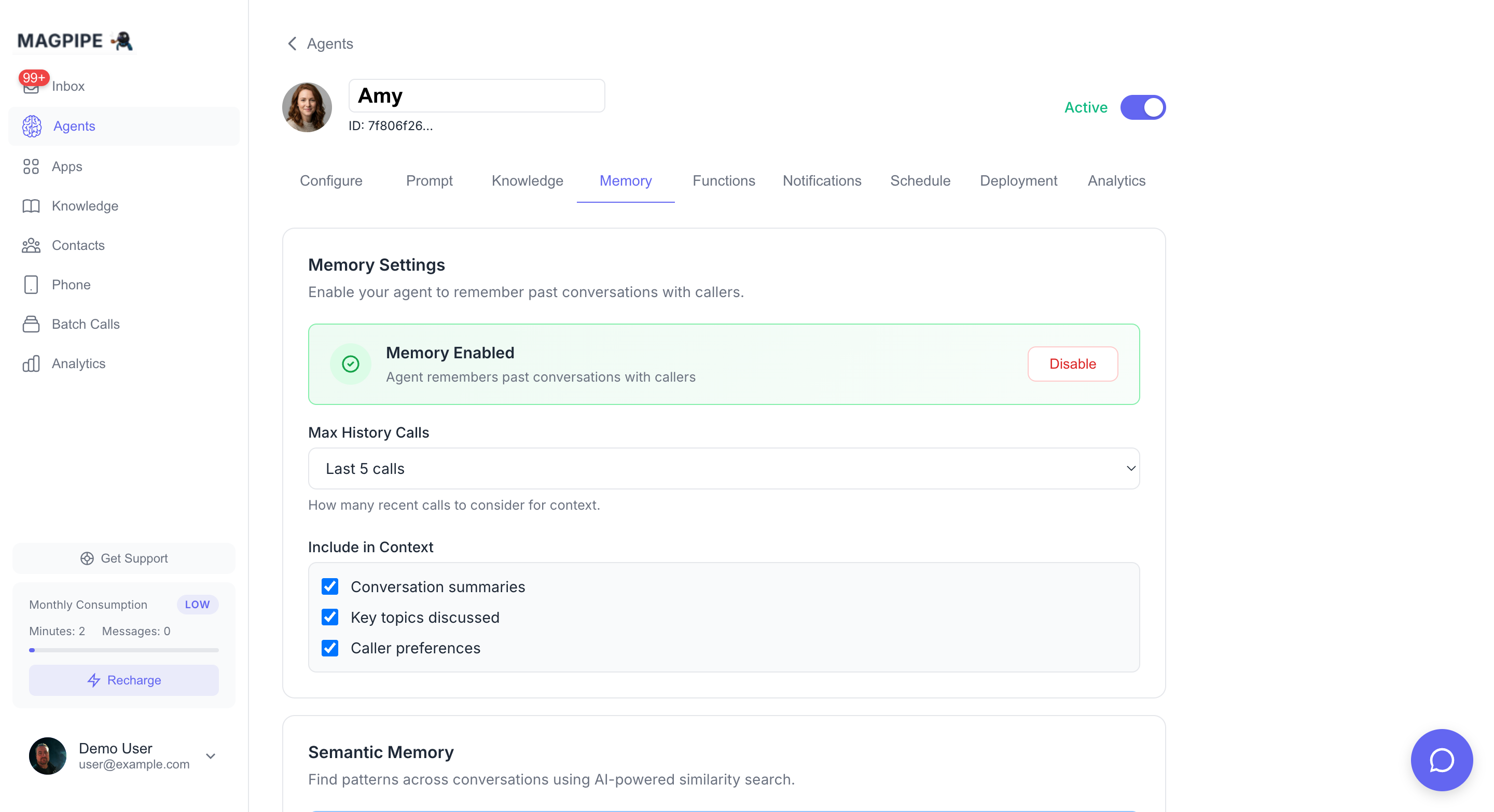
Go to **Agents** → Select your agent → **Memory** tab
Click **Enable** in the Memory Settings section
Adjust what information to include in context (optional)
Memory starts building immediately. After each call or SMS conversation, the agent automatically updates the contact's memory.
## Configuration
### Memory Settings
| Setting | Description | Default |
| ----------------------- | -------------------------------------------------------- | ------- |
| **Max History Calls** | Number of recent calls to consider when building context | 5 |
| **Include Summaries** | Add relationship summary to agent context | Yes |
| **Include Key Topics** | Add key topics to agent context | Yes |
| **Include Preferences** | Add caller preferences to agent context | Yes |
Start with defaults. If your agents are getting too much context (responses are slow or unfocused), reduce the history or disable some options.
### How Context is Injected
When a call or SMS comes in, memory is injected into the system prompt:
```
## CALLER MEMORY
You have spoken with this caller (Sarah Johnson) 3 time(s) before.
Summary of relationship: Regular customer, had delivery issues with
order #4521 that were resolved. Prefers email follow-ups.
Key topics discussed: orders, delivery, refunds
Caller preferences: {"contact_method": "email", "best_time": "afternoons"}
Use this context to provide personalized service. Reference past
conversations naturally when relevant, but don't be creepy about it.
```
## Semantic Memory
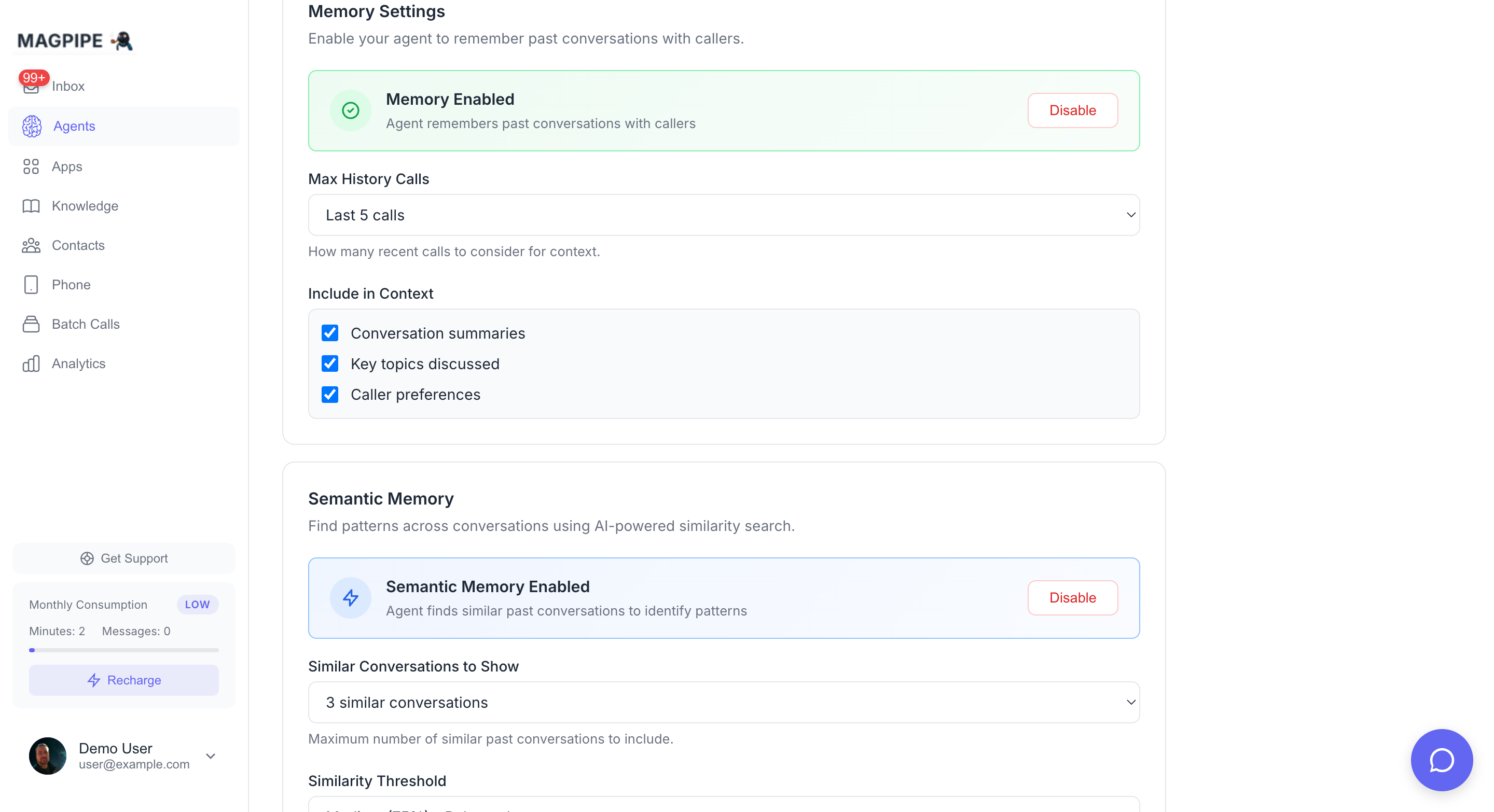
Semantic Memory is an advanced feature that uses AI to find patterns across **all contacts**, not just individual contact history. It works across both calls and SMS conversations.
### How It Works
1. After each call or SMS conversation, an AI embedding (vector) is generated from the interaction
2. When a new interaction comes in, the system searches for similar past conversations
3. If patterns are found, they're added to the agent's context
### Use Cases
If 5 customers call about the same bug in your app, semantic memory helps the agent recognize: "Multiple customers have reported this issue. Our team is aware and working on a fix."
"Several customers have asked about holiday shipping deadlines. Here are the cutoff dates..."
When you launch a new product, early callers' questions help inform responses to later callers.
### Configuring Semantic Memory
| Setting | Description | Default |
| ------------------------- | ---------------------------------------------- | ------- |
| **Similar Conversations** | How many similar past conversations to include | 3 |
| **Similarity Threshold** | How similar conversations must be (60-85%) | 75% |
**Threshold Guide:**
* **60% (Low)**: More results, broader matching, may include less relevant conversations
* **75% (Medium)**: Balanced - good for most use cases
* **85% (High)**: Fewer results, very precise matching
Semantic memory requires the base Memory feature to be enabled first.
## Managing Memories
### Viewing Memories
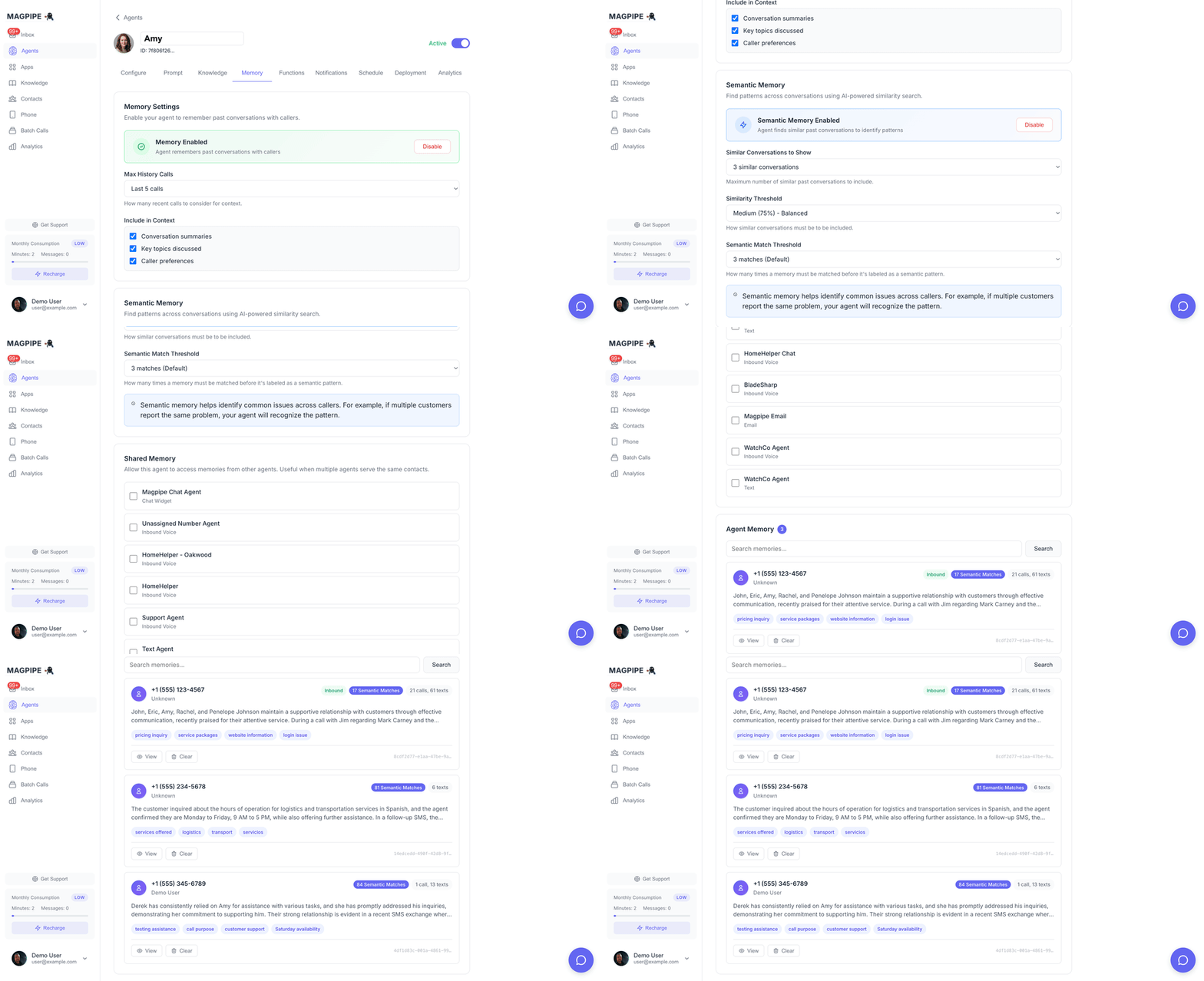
The Memory tab shows all stored caller memories:
| Column | Description |
| ---------------- | --------------------------------- |
| **Contact** | Caller's name and phone number |
| **Summary** | AI-generated relationship summary |
| **Topics** | Key topics discussed |
| **Interactions** | Number of conversations |
| **Last Contact** | When they last called |
Click any memory to view full details including call history.
### Editing Memories
Click a memory entry to:
* Update the summary
* Add/remove key topics
* Modify preferences
* View call history
Changes take effect on the next call from that contact.
### Clearing Memories
**Single Memory:**
1. Click the memory entry
2. Click **Clear Memory**
3. Confirm deletion
**All Memories:**
1. Click **Clear All** in the Memory section header
2. Confirm deletion
Clearing memories is permanent and cannot be undone.
## Privacy & Data
### What's Stored
Memory data is stored in your Magpipe database:
* Linked to contact records (by phone number)
* Associated with specific agent
* Includes AI-generated summaries (not raw transcripts)
* Embeddings for semantic search (vectors, not readable text)
### Data Retention
Memories persist indefinitely unless:
* Manually cleared via UI
* Contact is deleted
* Agent is deleted
### Compliance
For GDPR, CCPA, or other privacy compliance:
* Memories can be exported via API
* Individual memories can be deleted on request
* Use "Clear All" for right-to-erasure requests
## Best Practices
### When to Enable Memory
* Repeat customers
* Support lines
* Account management
* Appointment scheduling
* Sales follow-ups
* Anonymous hotlines
* One-time services
* High-privacy contexts
* Extremely high call volume
### Prompt Tips
When memory is enabled, adjust your system prompt:
```
You are a customer service agent for ACME Corp.
WHEN SPEAKING WITH RETURNING CALLERS:
- Reference past conversations naturally ("I see you called about...")
- Don't repeat information they already know
- Acknowledge their history as a customer
- If they had issues before, proactively check if resolved
IMPORTANT:
- Don't be creepy about knowing things - only reference what
came up in actual conversations
- If memory seems wrong, trust the caller ("Let me update that")
```
### Handling Memory Errors
If a caller disputes their memory:
* The agent should trust the caller
* Update memory based on new information
* Don't argue about past conversations
Example prompt addition:
```
If the caller says your memory is incorrect, apologize and
update your understanding. Say: "Let me correct that in my notes."
```
## Limits
| Plan | Memory per Agent | Semantic Memory |
| ---------- | ---------------- | --------------- |
| Starter | 100 callers | Not available |
| Pro | 1,000 callers | Included |
| Enterprise | Unlimited | Included |
## API Access
Memory can be accessed via the API:
```bash theme={null}
# Get memories for an agent
GET /conversation-contexts?agent_id={agent_id}
# Get specific memory
GET /conversation-contexts/{id}
# Update memory
PATCH /conversation-contexts/{id}
# Delete memory
DELETE /conversation-contexts/{id}
```
See [API Reference](/api-reference/endpoints/list-memories) for full documentation.
Extend agent capabilities with webhooks
Give your agent information to reference
Memory works across both phone calls and SMS conversations. Without memory, every interaction is treated as a new conversation. With memory enabled, your agent can say things like:
> "Hi Sarah! Good to hear from you again. Last time we spoke about your order #4521 - did that arrive okay?"
## How It Works
```
FIRST INTERACTION (call or SMS)
├── Contact: "Hi, I'm Sarah, calling about order 4521"
├── Agent handles the conversation
└── After interaction ends:
├── AI generates summary
├── Extracts key topics
├── Identifies preferences
└── Stores in memory database
NEXT INTERACTION (same contact - call or SMS)
├── Agent recognizes contact's phone number
├── Loads their memory:
│ ├── "Sarah, 2 previous interactions"
│ ├── "Topics: order 4521, delivery issues"
│ └── "Prefers email follow-ups"
├── Injects context into system prompt
└── Agent provides personalized service
```
## What Gets Remembered
### Summary
An AI-generated summary of the relationship with this caller:
```
"Sarah is a regular customer who has placed 3 orders. She had a
delivery issue with order #4521 that was resolved. Prefers to be
contacted by email. Generally satisfied with service."
```
### Key Topics
Important subjects discussed across conversations:
* `order issues`
* `refund request`
* `product questions`
* `billing inquiry`
* `appointment scheduling`
### Preferences
Caller's stated preferences and communication style:
```json theme={null}
{
"contact_method": "email",
"best_time": "afternoons",
"language": "Spanish preferred",
"accessibility": "speak slowly"
}
```
### Interaction History
* Number of conversations
* Recent call IDs
* When they last called
## Enabling Memory
Go to **Agents** → Select your agent → **Memory** tab
Click **Enable** in the Memory Settings section
Adjust what information to include in context (optional)
Memory starts building immediately. After each call or SMS conversation, the agent automatically updates the contact's memory.
## Configuration
### Memory Settings
| Setting | Description | Default |
| ----------------------- | -------------------------------------------------------- | ------- |
| **Max History Calls** | Number of recent calls to consider when building context | 5 |
| **Include Summaries** | Add relationship summary to agent context | Yes |
| **Include Key Topics** | Add key topics to agent context | Yes |
| **Include Preferences** | Add caller preferences to agent context | Yes |
Start with defaults. If your agents are getting too much context (responses are slow or unfocused), reduce the history or disable some options.
### How Context is Injected
When a call or SMS comes in, memory is injected into the system prompt:
```
## CALLER MEMORY
You have spoken with this caller (Sarah Johnson) 3 time(s) before.
Summary of relationship: Regular customer, had delivery issues with
order #4521 that were resolved. Prefers email follow-ups.
Key topics discussed: orders, delivery, refunds
Caller preferences: {"contact_method": "email", "best_time": "afternoons"}
Use this context to provide personalized service. Reference past
conversations naturally when relevant, but don't be creepy about it.
```
## Semantic Memory
Semantic Memory is an advanced feature that uses AI to find patterns across **all contacts**, not just individual contact history. It works across both calls and SMS conversations.
### How It Works
1. After each call or SMS conversation, an AI embedding (vector) is generated from the interaction
2. When a new interaction comes in, the system searches for similar past conversations
3. If patterns are found, they're added to the agent's context
### Use Cases
If 5 customers call about the same bug in your app, semantic memory helps the agent recognize: "Multiple customers have reported this issue. Our team is aware and working on a fix."
"Several customers have asked about holiday shipping deadlines. Here are the cutoff dates..."
When you launch a new product, early callers' questions help inform responses to later callers.
### Configuring Semantic Memory
| Setting | Description | Default |
| ------------------------- | ---------------------------------------------- | ------- |
| **Similar Conversations** | How many similar past conversations to include | 3 |
| **Similarity Threshold** | How similar conversations must be (60-85%) | 75% |
**Threshold Guide:**
* **60% (Low)**: More results, broader matching, may include less relevant conversations
* **75% (Medium)**: Balanced - good for most use cases
* **85% (High)**: Fewer results, very precise matching
Semantic memory requires the base Memory feature to be enabled first.
## Managing Memories
### Viewing Memories
The Memory tab shows all stored caller memories:
| Column | Description |
| ---------------- | --------------------------------- |
| **Contact** | Caller's name and phone number |
| **Summary** | AI-generated relationship summary |
| **Topics** | Key topics discussed |
| **Interactions** | Number of conversations |
| **Last Contact** | When they last called |
Click any memory to view full details including call history.
### Editing Memories
Click a memory entry to:
* Update the summary
* Add/remove key topics
* Modify preferences
* View call history
Changes take effect on the next call from that contact.
### Clearing Memories
**Single Memory:**
1. Click the memory entry
2. Click **Clear Memory**
3. Confirm deletion
**All Memories:**
1. Click **Clear All** in the Memory section header
2. Confirm deletion
Clearing memories is permanent and cannot be undone.
## Privacy & Data
### What's Stored
Memory data is stored in your Magpipe database:
* Linked to contact records (by phone number)
* Associated with specific agent
* Includes AI-generated summaries (not raw transcripts)
* Embeddings for semantic search (vectors, not readable text)
### Data Retention
Memories persist indefinitely unless:
* Manually cleared via UI
* Contact is deleted
* Agent is deleted
### Compliance
For GDPR, CCPA, or other privacy compliance:
* Memories can be exported via API
* Individual memories can be deleted on request
* Use "Clear All" for right-to-erasure requests
## Best Practices
### When to Enable Memory
* Repeat customers
* Support lines
* Account management
* Appointment scheduling
* Sales follow-ups
* Anonymous hotlines
* One-time services
* High-privacy contexts
* Extremely high call volume
### Prompt Tips
When memory is enabled, adjust your system prompt:
```
You are a customer service agent for ACME Corp.
WHEN SPEAKING WITH RETURNING CALLERS:
- Reference past conversations naturally ("I see you called about...")
- Don't repeat information they already know
- Acknowledge their history as a customer
- If they had issues before, proactively check if resolved
IMPORTANT:
- Don't be creepy about knowing things - only reference what
came up in actual conversations
- If memory seems wrong, trust the caller ("Let me update that")
```
### Handling Memory Errors
If a caller disputes their memory:
* The agent should trust the caller
* Update memory based on new information
* Don't argue about past conversations
Example prompt addition:
```
If the caller says your memory is incorrect, apologize and
update your understanding. Say: "Let me correct that in my notes."
```
## Limits
| Plan | Memory per Agent | Semantic Memory |
| ---------- | ---------------- | --------------- |
| Starter | 100 callers | Not available |
| Pro | 1,000 callers | Included |
| Enterprise | Unlimited | Included |
## API Access
Memory can be accessed via the API:
```bash theme={null}
# Get memories for an agent
GET /conversation-contexts?agent_id={agent_id}
# Get specific memory
GET /conversation-contexts/{id}
# Update memory
PATCH /conversation-contexts/{id}
# Delete memory
DELETE /conversation-contexts/{id}
```
See [API Reference](/api-reference/endpoints/list-memories) for full documentation.
Extend agent capabilities with webhooks
Give your agent information to reference