> ## Documentation Index
> Fetch the complete documentation index at: https://docs.magpipe.ai/llms.txt
> Use this file to discover all available pages before exploring further.
# Agent Notifications
> Configure per-agent notification channels for calls, messages, and app integrations
## Overview
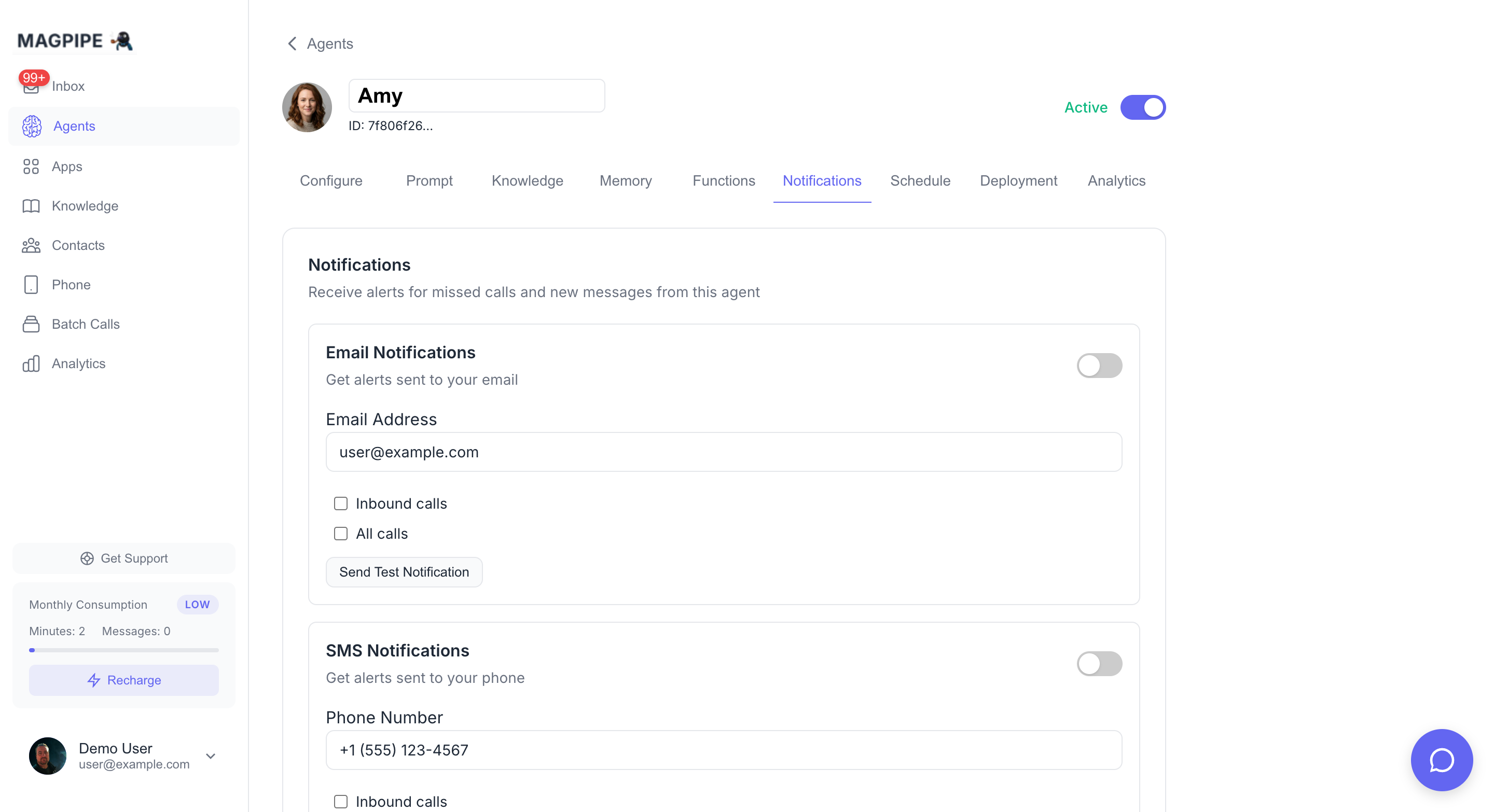
Each agent has its own notification settings. Configure which channels receive alerts for calls and messages, independently per agent. Access notifications from **Agent Detail** → **Notifications** tab.
 ## Notification Channels
### Email Notifications
Get email alerts for agent activity:
| Setting | Description |
| -------------------- | ----------------------------------------------------- |
| **Enabled** | Master toggle for email notifications |
| **Email Address** | Where to send alerts (defaults to your account email) |
| **Inbound Calls** | Alert on incoming calls |
| **All Calls** | Alert on all calls (inbound + outbound) |
| **Inbound Messages** | Alert on incoming SMS/chat messages |
| **All Messages** | Alert on all messages |
### SMS Notifications
Get text message alerts:
| Setting | Description |
| -------------------- | --------------------------------------------------------- |
| **Enabled** | Master toggle for SMS notifications |
| **Phone Number** | Where to send SMS alerts (defaults to your account phone) |
| **Inbound Calls** | Alert on incoming calls |
| **All Calls** | Alert on all calls |
| **Inbound Messages** | Alert on incoming messages |
| **All Messages** | Alert on all messages |
### Push Notifications
Get instant alerts on your device:
| Setting | Description |
| -------------------- | ------------------------------------ |
| **Enabled** | Master toggle for push notifications |
| **Inbound Calls** | Push alert on incoming calls |
| **All Calls** | Push alert on all calls |
| **Inbound Messages** | Push alert on incoming messages |
| **All Messages** | Push alert on all messages |
Push notifications require a modern browser (iOS 16.4+ for Safari) and the app must be installed as a PWA on mobile devices.
### Slack Notifications
Route notifications to any Slack channel — public or private. Select a channel from the dropdown when configuring notifications or extracted data routing. Private channels require the Magpipe bot to be a member.
### App Notifications
Control which connected apps receive data from this agent's conversations. Apps like Slack and HubSpot appear here once connected from the [Apps](/features/apps) page.
Each app card has:
* **Master toggle** — Enable/disable the app for this agent
* **SMS messages** — Send SMS conversation data to the app
* **Call summaries** — Send call summary data to the app
* **Web chat messages** — Send chat widget conversation data to the app
* **Include translations** — Include translated content (when translation is enabled)
## Per-Agent Independence
Each agent maintains its own notification preferences. Changing notifications for one agent does not affect any other agent. This allows you to:
* Get email alerts for your primary agent but not test agents
* Route different agents to different Slack channels
* Enable push notifications only for high-priority agents
## Auto-Save
All notification settings auto-save when changed. A "Saved" indicator confirms the save completed successfully.
Connect Slack, HubSpot, and more
Account and billing settings
## Notification Channels
### Email Notifications
Get email alerts for agent activity:
| Setting | Description |
| -------------------- | ----------------------------------------------------- |
| **Enabled** | Master toggle for email notifications |
| **Email Address** | Where to send alerts (defaults to your account email) |
| **Inbound Calls** | Alert on incoming calls |
| **All Calls** | Alert on all calls (inbound + outbound) |
| **Inbound Messages** | Alert on incoming SMS/chat messages |
| **All Messages** | Alert on all messages |
### SMS Notifications
Get text message alerts:
| Setting | Description |
| -------------------- | --------------------------------------------------------- |
| **Enabled** | Master toggle for SMS notifications |
| **Phone Number** | Where to send SMS alerts (defaults to your account phone) |
| **Inbound Calls** | Alert on incoming calls |
| **All Calls** | Alert on all calls |
| **Inbound Messages** | Alert on incoming messages |
| **All Messages** | Alert on all messages |
### Push Notifications
Get instant alerts on your device:
| Setting | Description |
| -------------------- | ------------------------------------ |
| **Enabled** | Master toggle for push notifications |
| **Inbound Calls** | Push alert on incoming calls |
| **All Calls** | Push alert on all calls |
| **Inbound Messages** | Push alert on incoming messages |
| **All Messages** | Push alert on all messages |
Push notifications require a modern browser (iOS 16.4+ for Safari) and the app must be installed as a PWA on mobile devices.
### Slack Notifications
Route notifications to any Slack channel — public or private. Select a channel from the dropdown when configuring notifications or extracted data routing. Private channels require the Magpipe bot to be a member.
### App Notifications
Control which connected apps receive data from this agent's conversations. Apps like Slack and HubSpot appear here once connected from the [Apps](/features/apps) page.
Each app card has:
* **Master toggle** — Enable/disable the app for this agent
* **SMS messages** — Send SMS conversation data to the app
* **Call summaries** — Send call summary data to the app
* **Web chat messages** — Send chat widget conversation data to the app
* **Include translations** — Include translated content (when translation is enabled)
## Per-Agent Independence
Each agent maintains its own notification preferences. Changing notifications for one agent does not affect any other agent. This allows you to:
* Get email alerts for your primary agent but not test agents
* Route different agents to different Slack channels
* Enable push notifications only for high-priority agents
## Auto-Save
All notification settings auto-save when changed. A "Saved" indicator confirms the save completed successfully.
Connect Slack, HubSpot, and more
Account and billing settings