> ## Documentation Index
> Fetch the complete documentation index at: https://docs.magpipe.ai/llms.txt
> Use this file to discover all available pages before exploring further.
# Credits & Billing
> Usage-based billing with credits for calls, SMS, and AI features
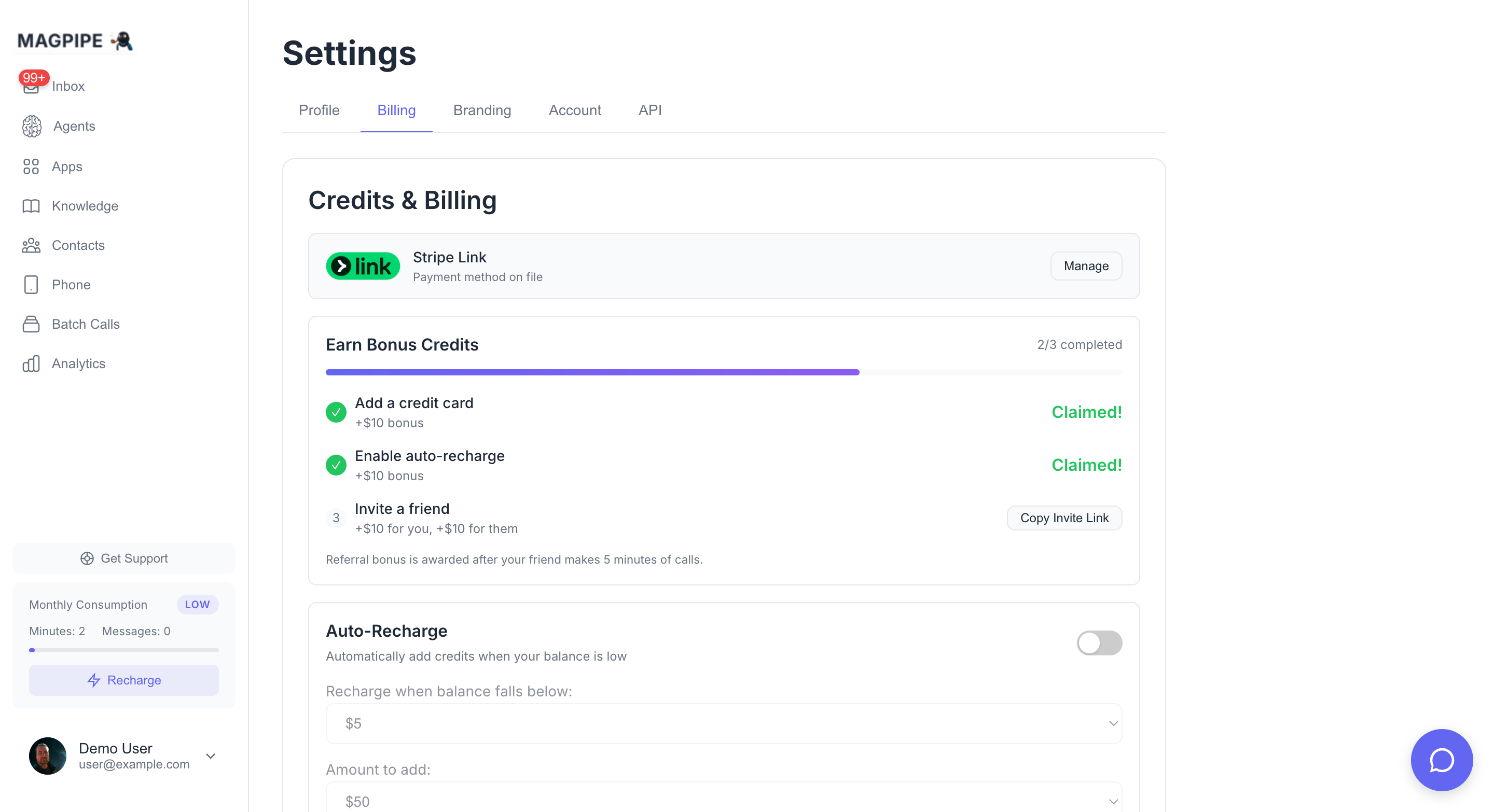
Magpipe uses a simple credits-based billing system. You purchase credits and they're automatically deducted as you use the platform. No complex subscriptions or hidden fees.
 ## How Credits Work
Credits are measured in dollars. When you make calls or send SMS, the cost is deducted from your balance in real-time.
### What Uses Credits
| Feature | Cost |
| ---------------- | ----------------------------------------------- |
| **Voice Calls** | \$0.09-0.15/minute (varies by voice + AI model) |
| **SMS Messages** | \$0.001/message |
### Voice Call Pricing Breakdown
Voice calls have three cost components:
| Component | Rate |
| ---------------------- | ------------------ |
| **Voice (ElevenLabs)** | \$0.07/minute |
| **Voice (OpenAI)** | \$0.08/minute |
| **Telephony (PSTN)** | \$0.015/minute |
| **AI Model** | Varies (see below) |
**AI Model Rates (per minute):**
| Model | Rate |
| ----------------- | ------- |
| GPT-4o | \$0.05 |
| GPT-4o-mini | \$0.006 |
| Claude 3.5 Sonnet | \$0.05 |
| Claude 3 Haiku | \$0.006 |
**Example**: A 5-minute call using ElevenLabs voice + GPT-4o-mini costs approximately \$0.46
* Voice: 5 × $0.07 = $0.35
* AI: 5 × $0.006 = $0.03
* Telephony: 5 × $0.015 = $0.075
## Getting Started
### Welcome Bonus
New users receive a **\$20 welcome bonus** when they add a payment method. This gives you enough credits to test the platform extensively.
To claim your bonus:
1. Go to **Settings → Billing**
2. Click **Add Payment Method**
3. Complete the Stripe checkout
4. Your \$20 bonus is automatically credited
### Adding Credits
You can add credits at any time from the Billing tab:
**Quick Add Options:**
* \$20
* \$50
* \$100
**Custom Amount:** Enter any amount between $10 and $1,000.
Credits are added instantly after payment completes.
## Auto-Recharge
Never run out of credits mid-call. Auto-recharge automatically tops up your balance when it falls below a threshold.
### How It Works
1. Set a **threshold** (e.g., \$5)
2. Set a **recharge amount** (e.g., \$50)
3. When your balance drops below $5, we automatically charge your card for $50
Auto-recharge uses your saved payment method. If the charge fails (e.g., expired card), auto-recharge is disabled until you update your payment method.
### Enabling Auto-Recharge
1. Go to **Settings → Billing**
2. Toggle **Auto-Recharge** on
3. Set your preferred threshold and amount
Auto-recharge is automatically enabled when you claim your welcome bonus.
## Managing Your Billing
### View Balance & Usage
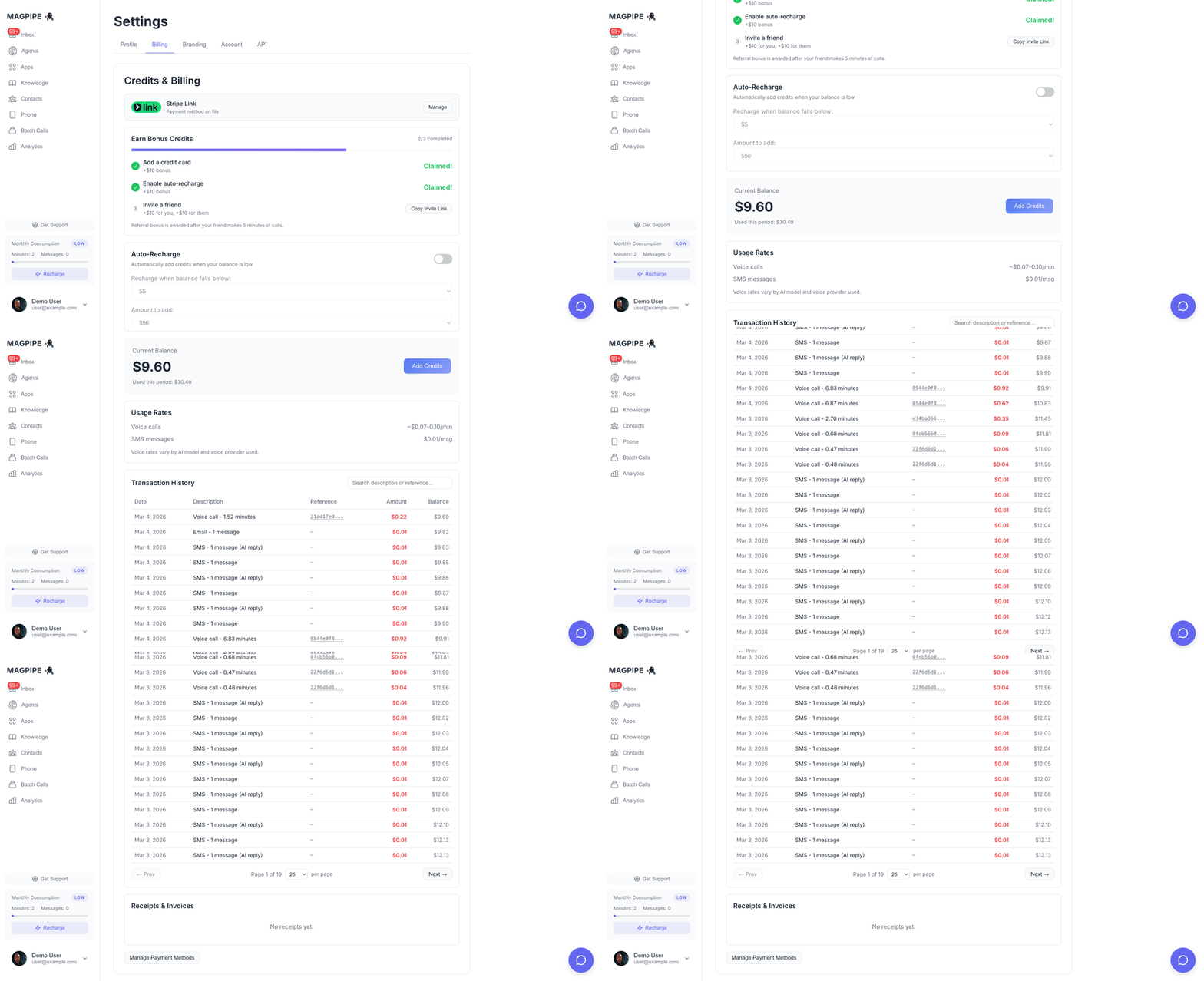
Your current balance and period usage are displayed at the top of the Billing tab:
```
Current Balance: $45.23
Used This Period: $74.77
```
### Transaction History
All credit transactions are logged and can be viewed in your account. Each transaction shows:
* Amount (positive for additions, negative for deductions)
* Type (purchase, deduction, auto-recharge, bonus)
* Description (what it was for)
* Timestamp
### Payment Methods
Click **Manage Billing** to access the Stripe customer portal where you can:
* Update your credit card
* View invoices and receipts
* Download statements
## Credit Deduction
Credits are deducted in real-time as you use features:
### Voice Calls
* Calculated when the call ends
* Based on actual duration (rounded to the second)
* Includes voice, AI, and telephony costs
### SMS Messages
* Deducted immediately when sent
* \$0.001 per message segment
* Long messages may use multiple segments
## FAQ
If your balance reaches \$0, you won't be able to make new calls or send SMS until you add more credits. Active calls will complete normally.
Unused credits can be refunded within 30 days of purchase. Contact [help@magpipe.ai](mailto:help@magpipe.ai) for refund requests.
No, credits never expire. Use them whenever you need.
Yes, use the auto-recharge feature to control your spending. Set a low recharge amount or disable auto-recharge entirely to manually control when you add credits.
Click **Manage Billing** in the Billing tab to access the Stripe customer portal. All invoices and receipts are available there.
## Enterprise Pricing
For high-volume usage or custom requirements, contact us for enterprise pricing:
* Volume discounts
* Custom payment terms
* Dedicated support
* SLA guarantees
Email [help@magpipe.ai](mailto:help@magpipe.ai) to discuss enterprise options.
## How Credits Work
Credits are measured in dollars. When you make calls or send SMS, the cost is deducted from your balance in real-time.
### What Uses Credits
| Feature | Cost |
| ---------------- | ----------------------------------------------- |
| **Voice Calls** | \$0.09-0.15/minute (varies by voice + AI model) |
| **SMS Messages** | \$0.001/message |
### Voice Call Pricing Breakdown
Voice calls have three cost components:
| Component | Rate |
| ---------------------- | ------------------ |
| **Voice (ElevenLabs)** | \$0.07/minute |
| **Voice (OpenAI)** | \$0.08/minute |
| **Telephony (PSTN)** | \$0.015/minute |
| **AI Model** | Varies (see below) |
**AI Model Rates (per minute):**
| Model | Rate |
| ----------------- | ------- |
| GPT-4o | \$0.05 |
| GPT-4o-mini | \$0.006 |
| Claude 3.5 Sonnet | \$0.05 |
| Claude 3 Haiku | \$0.006 |
**Example**: A 5-minute call using ElevenLabs voice + GPT-4o-mini costs approximately \$0.46
* Voice: 5 × $0.07 = $0.35
* AI: 5 × $0.006 = $0.03
* Telephony: 5 × $0.015 = $0.075
## Getting Started
### Welcome Bonus
New users receive a **\$20 welcome bonus** when they add a payment method. This gives you enough credits to test the platform extensively.
To claim your bonus:
1. Go to **Settings → Billing**
2. Click **Add Payment Method**
3. Complete the Stripe checkout
4. Your \$20 bonus is automatically credited
### Adding Credits
You can add credits at any time from the Billing tab:
**Quick Add Options:**
* \$20
* \$50
* \$100
**Custom Amount:** Enter any amount between $10 and $1,000.
Credits are added instantly after payment completes.
## Auto-Recharge
Never run out of credits mid-call. Auto-recharge automatically tops up your balance when it falls below a threshold.
### How It Works
1. Set a **threshold** (e.g., \$5)
2. Set a **recharge amount** (e.g., \$50)
3. When your balance drops below $5, we automatically charge your card for $50
Auto-recharge uses your saved payment method. If the charge fails (e.g., expired card), auto-recharge is disabled until you update your payment method.
### Enabling Auto-Recharge
1. Go to **Settings → Billing**
2. Toggle **Auto-Recharge** on
3. Set your preferred threshold and amount
Auto-recharge is automatically enabled when you claim your welcome bonus.
## Managing Your Billing
### View Balance & Usage
Your current balance and period usage are displayed at the top of the Billing tab:
```
Current Balance: $45.23
Used This Period: $74.77
```
### Transaction History
All credit transactions are logged and can be viewed in your account. Each transaction shows:
* Amount (positive for additions, negative for deductions)
* Type (purchase, deduction, auto-recharge, bonus)
* Description (what it was for)
* Timestamp
### Payment Methods
Click **Manage Billing** to access the Stripe customer portal where you can:
* Update your credit card
* View invoices and receipts
* Download statements
## Credit Deduction
Credits are deducted in real-time as you use features:
### Voice Calls
* Calculated when the call ends
* Based on actual duration (rounded to the second)
* Includes voice, AI, and telephony costs
### SMS Messages
* Deducted immediately when sent
* \$0.001 per message segment
* Long messages may use multiple segments
## FAQ
If your balance reaches \$0, you won't be able to make new calls or send SMS until you add more credits. Active calls will complete normally.
Unused credits can be refunded within 30 days of purchase. Contact [help@magpipe.ai](mailto:help@magpipe.ai) for refund requests.
No, credits never expire. Use them whenever you need.
Yes, use the auto-recharge feature to control your spending. Set a low recharge amount or disable auto-recharge entirely to manually control when you add credits.
Click **Manage Billing** in the Billing tab to access the Stripe customer portal. All invoices and receipts are available there.
## Enterprise Pricing
For high-volume usage or custom requirements, contact us for enterprise pricing:
* Volume discounts
* Custom payment terms
* Dedicated support
* SLA guarantees
Email [help@magpipe.ai](mailto:help@magpipe.ai) to discuss enterprise options.