> ## Documentation Index
> Fetch the complete documentation index at: https://docs.magpipe.ai/llms.txt
> Use this file to discover all available pages before exploring further.
# Custom Functions
> Define custom webhooks your AI agent can call during conversations
## Overview
Custom Functions allow you to extend your AI agent's capabilities by defining webhooks it can call during conversations. This enables real-time integration with your CRM, order systems, appointment schedulers, databases, and any other external service.
When a caller asks for information your agent doesn't have (like order status, account balance, or inventory availability), the agent can call your webhook to fetch that data and respond naturally.
 ## How It Works
```
Caller: "What's the status of my order 12345?"
↓
Agent recognizes need for order lookup
↓
Agent calls your check_order_status webhook
↓
Your server returns: {"status": "shipped", "eta": "tomorrow"}
↓
Agent: "Your order 12345 has shipped and should arrive tomorrow!"
```
## Creating a Custom Function
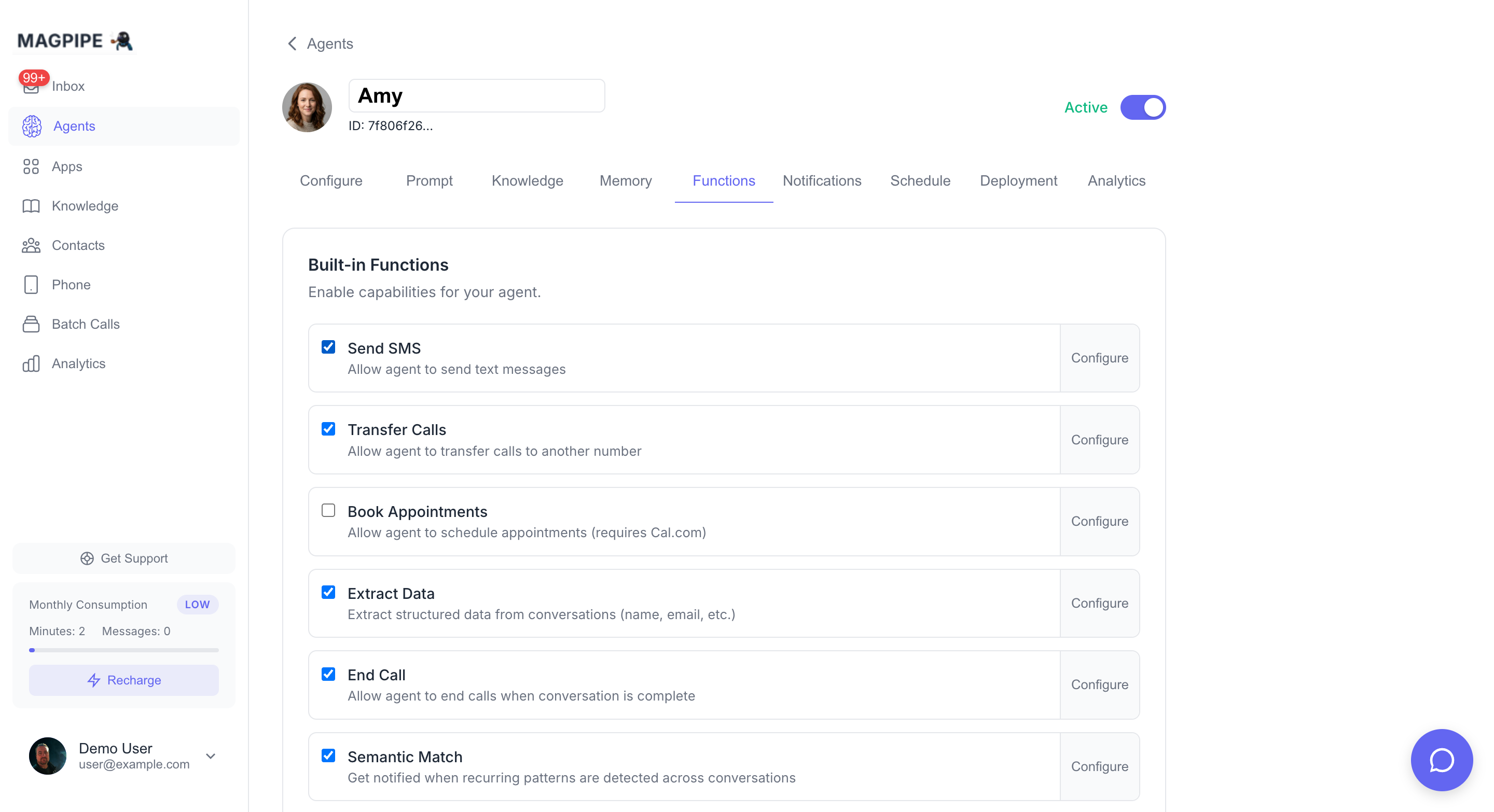
Go to **Agents** → Select your agent → **Functions** tab
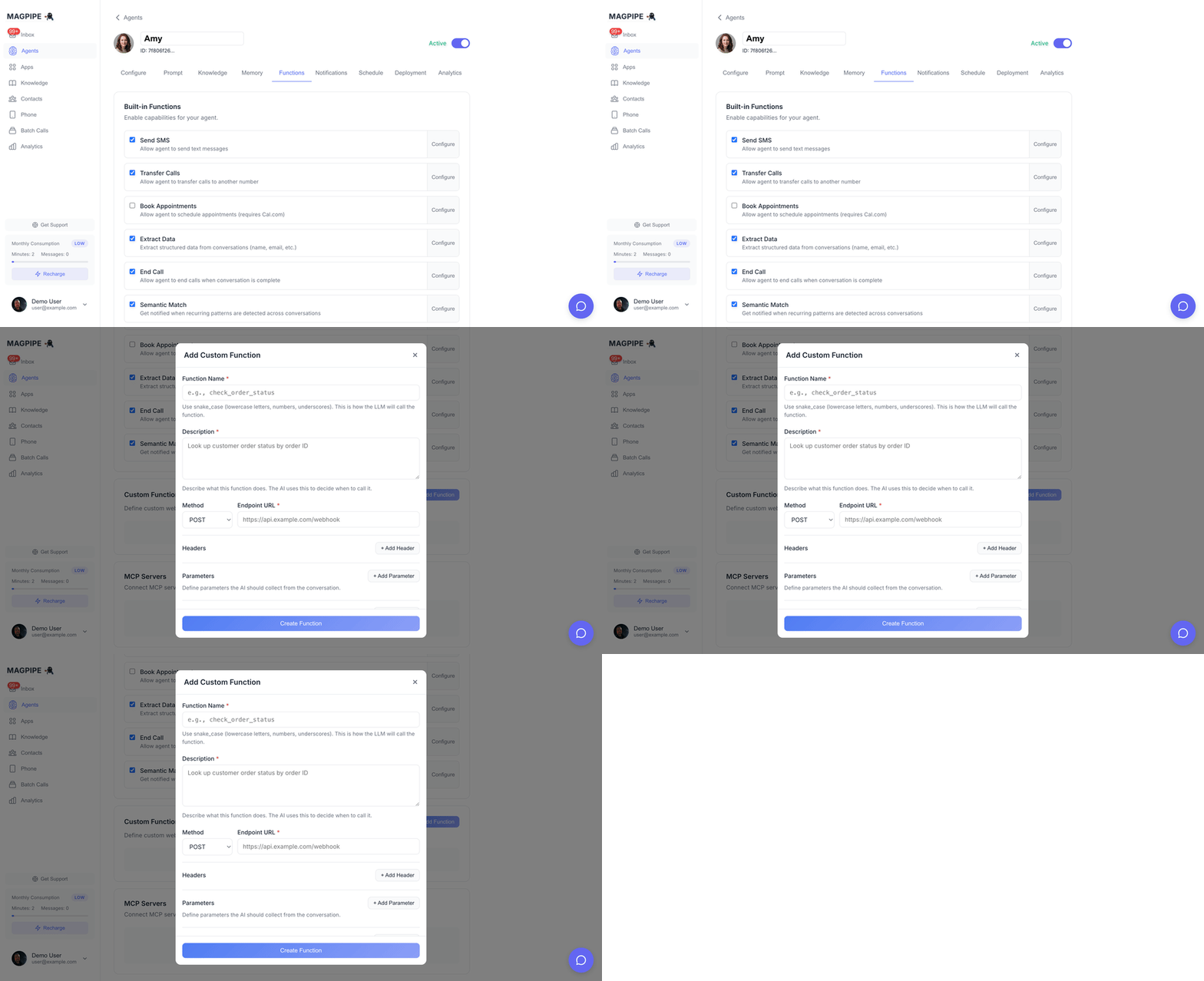
Click the **Add Function** button in the Custom Functions section
* **Function Name**: Use snake\_case (e.g., `check_order_status`)
* **Description**: Explain what it does - the AI uses this to decide when to call it
* **Method**: GET, POST, PUT, PATCH, or DELETE
* **Endpoint URL**: Your webhook URL (must be HTTPS)
Add parameters the AI should collect from the conversation:
* Name (snake\_case)
* Type (string, number, boolean)
* Description (helps AI understand what to collect)
* Required (must be provided before calling)
Save the function, then make a test call to verify it works
## Configuration Options
### Basic Info
| Field | Description | Example |
| --------------- | -------------------------------------- | ------------------------------------------- |
| **Name** | Function identifier (snake\_case) | `check_order_status` |
| **Description** | What the function does (AI reads this) | "Look up customer order status by order ID" |
Write clear descriptions. The AI uses the description to decide when to call the function. Be specific about what information it retrieves.
### HTTP Configuration
| Field | Description |
| ---------------- | ---------------------------------------------- |
| **Method** | HTTP method (GET, POST, PUT, PATCH, DELETE) |
| **Endpoint URL** | Your webhook URL (must be HTTPS in production) |
### Headers
Add custom headers to include with requests:
| Header | Value | Use Case |
| --------------- | --------------------- | ------------------ |
| `Authorization` | `Bearer your-api-key` | API authentication |
| `X-API-Key` | `your-key` | Alternative auth |
| `Content-Type` | `application/json` | Usually automatic |
### Parameters
Define what information the AI should collect before calling:
| Field | Description |
| --------------- | -------------------------------- |
| **Name** | Parameter name (snake\_case) |
| **Type** | `string`, `number`, or `boolean` |
| **Description** | What this parameter represents |
| **Required** | Must be collected before calling |
**Example Parameters:**
```json theme={null}
[
{
"name": "order_id",
"type": "string",
"description": "The customer's order ID or confirmation number",
"required": true
},
{
"name": "include_tracking",
"type": "boolean",
"description": "Whether to include tracking information",
"required": false
}
]
```
### Response Variables
Extract specific values from the webhook response using JSON paths:
| Field | Description |
| ------------- | ----------------------------------------- |
| **Name** | Variable name for the extracted value |
| **JSON Path** | Path to the value (e.g., `$.data.status`) |
**Example:**
If your webhook returns:
```json theme={null}
{
"success": true,
"data": {
"status": "shipped",
"tracking_number": "1Z999AA10123456784",
"eta": "2024-01-15"
}
}
```
Configure response variables:
* `status` → `$.data.status`
* `tracking` → `$.data.tracking_number`
* `eta` → `$.data.eta`
### Advanced Settings
| Setting | Default | Description |
| --------------- | -------- | ----------------------------------- |
| **Timeout** | 120000ms | Maximum time to wait for response |
| **Max Retries** | 2 | Number of retry attempts on failure |
## Example Functions
### Order Status Lookup
```
Name: check_order_status
Description: Look up the current status of a customer's order by order ID
Method: POST
URL: https://api.yourstore.com/orders/status
Parameters:
- order_id (string, required): The order confirmation number
Response Variables:
- status → $.status
- eta → $.estimated_delivery
```
### Account Balance Check
```
Name: get_account_balance
Description: Check a customer's current account balance
Method: GET
URL: https://api.yourservice.com/accounts/balance
Parameters:
- account_number (string, required): Customer's account number
- phone_last_four (string, required): Last 4 digits of phone for verification
Response Variables:
- balance → $.balance
- due_date → $.next_payment_due
```
### Appointment Availability
```
Name: check_availability
Description: Check available appointment slots for a specific date
Method: GET
URL: https://api.yourbusiness.com/appointments/slots
Parameters:
- date (string, required): The date to check (YYYY-MM-DD format)
- service_type (string, required): Type of service requested
Response Variables:
- slots → $.available_slots
- next_available → $.next_available_date
```
## Webhook Implementation
### Request Format
Your webhook receives a POST request (or specified method) with:
**Headers:**
```
Content-Type: application/json
X-Magpipe-Timestamp: 1707184123
X-Magpipe-Signature: abc123...
```
**Body:**
```json theme={null}
{
"order_id": "12345",
"include_tracking": true,
"session_id": "session_abc123",
"channel_type": "call"
}
```
`session_id` is a unique identifier for the current conversation session. `channel_type` indicates how the customer is communicating — `"call"`, `"sms"`, or `"chat"`. Both are automatically injected by the agent alongside your defined parameters.
On messaging channels (WhatsApp/SMS), the agent injects a few more server-known fields so your function can capture things the model can't reliably supply on its own:
* `from` — the contact's phone number.
* `images` / `media_urls` — present only when the contact sent photos in the current session. Both hold the same array of **re-hosted, time-limited signed URLs** (valid \~7 days; the inbox re-signs from a durable path after expiry) you can `GET` directly with no credentials. The model can't see image content, so these are attached automatically — you don't (and shouldn't) ask the model for them.
These injected values always take precedence over anything the model puts in the same field, so you can rely on them.
### Response Format
Return a JSON response:
```json theme={null}
{
"success": true,
"data": {
"status": "shipped",
"tracking_number": "1Z999AA10123456784"
}
}
```
Or for errors:
```json theme={null}
{
"success": false,
"error": "Order not found"
}
```
### Verifying Request Signatures
For security, verify that requests come from Magpipe:
```javascript Node.js theme={null}
const crypto = require('crypto');
function verifySignature(payload, timestamp, signature, secret) {
const data = `${timestamp}.${JSON.stringify(payload)}`;
const expected = crypto
.createHmac('sha256', secret)
.update(data)
.digest('hex');
return crypto.timingSafeEqual(
Buffer.from(signature),
Buffer.from(expected)
);
}
// In your webhook handler:
app.post('/webhook', (req, res) => {
const timestamp = req.headers['x-magpipe-timestamp'];
const signature = req.headers['x-magpipe-signature'];
if (!verifySignature(req.body, timestamp, signature, process.env.WEBHOOK_SECRET)) {
return res.status(401).json({ error: 'Invalid signature' });
}
// Process the request...
});
```
```python Python theme={null}
import hmac
import hashlib
import json
def verify_signature(payload: dict, timestamp: str, signature: str, secret: str) -> bool:
data = f"{timestamp}.{json.dumps(payload, sort_keys=True)}"
expected = hmac.new(
secret.encode(),
data.encode(),
hashlib.sha256
).hexdigest()
return hmac.compare_digest(signature, expected)
# In your webhook handler:
@app.route('/webhook', methods=['POST'])
def webhook():
timestamp = request.headers.get('X-Magpipe-Timestamp')
signature = request.headers.get('X-Magpipe-Signature')
if not verify_signature(request.json, timestamp, signature, WEBHOOK_SECRET):
return jsonify({'error': 'Invalid signature'}), 401
# Process the request...
```
Request signing is optional but recommended for production. Set the `CUSTOM_FUNCTION_WEBHOOK_SECRET` environment variable on the agent server to enable signing.
## Best Practices
### Function Design
The AI uses your description to decide when to call the function. Be specific:
**Good:** "Look up customer order status by order ID. Returns shipping status, tracking number, and estimated delivery date."
**Bad:** "Get order info"
Help the AI understand what to collect:
**Good:** `order_confirmation_number`, `customer_email`
**Bad:** `id`, `data`
Only mark parameters as required if the function truly can't work without them. Optional parameters give flexibility.
Return clear error messages so the AI can explain issues to callers:
```json theme={null}
{
"success": false,
"error": "No order found with that ID. Please check the number and try again."
}
```
### Webhook Implementation
Keep webhook response times under 5 seconds. The AI waits for the response before continuing the conversation. Long delays feel unnatural.
Return data in a format the AI can naturally speak:
**Good:** `"status": "Your order shipped yesterday and will arrive by Friday"`
**Okay:** `"status": "SHIPPED", "eta": "2024-01-15"`
Validate all input parameters. Don't assume the AI will always send perfect data.
Always use HTTPS endpoints in production for security.
## Testing
### Using Webhook.site
For testing without building a server:
1. Go to [webhook.site](https://webhook.site)
2. Copy your unique URL
3. Use it as your endpoint URL
4. Make a test call and ask the AI to trigger the function
5. See the request in webhook.site
### Test Conversation
After creating a function, test it:
1. Call your agent's phone number
2. Ask something that should trigger the function
3. Verify the webhook receives the request
4. Confirm the AI speaks the response correctly
**Example test for order lookup:**
> "Hi, I'd like to check on my order. The order number is 12345."
## Troubleshooting
* Check the function description - is it clear when to use it?
* Verify the function is set to "Active"
* Make sure required parameters match what the caller might say
* Verify the endpoint URL is correct and accessible
* Check that HTTPS is working (no certificate errors)
* Look for firewall or network issues
* Check webhook response format (must be valid JSON)
* Verify response variables have correct JSON paths
* Ensure response is returned within timeout
* Verify webhook secret matches on both ends
* Check timestamp format (Unix seconds)
* Ensure payload isn't modified before verification
If your endpoint is returning 401 errors, verify that headers are configured in the Functions tab for your agent. Headers like `Authorization` or `x-api-key` must be set there — they are not inherited from anywhere else.
## Limits
| Plan | Custom Functions per Agent |
| ---------- | -------------------------- |
| Starter | 3 |
| Pro | 10 |
| Enterprise | Unlimited |
Create functions via API
Pre-built integrations
## How It Works
```
Caller: "What's the status of my order 12345?"
↓
Agent recognizes need for order lookup
↓
Agent calls your check_order_status webhook
↓
Your server returns: {"status": "shipped", "eta": "tomorrow"}
↓
Agent: "Your order 12345 has shipped and should arrive tomorrow!"
```
## Creating a Custom Function
Go to **Agents** → Select your agent → **Functions** tab
Click the **Add Function** button in the Custom Functions section
* **Function Name**: Use snake\_case (e.g., `check_order_status`)
* **Description**: Explain what it does - the AI uses this to decide when to call it
* **Method**: GET, POST, PUT, PATCH, or DELETE
* **Endpoint URL**: Your webhook URL (must be HTTPS)
Add parameters the AI should collect from the conversation:
* Name (snake\_case)
* Type (string, number, boolean)
* Description (helps AI understand what to collect)
* Required (must be provided before calling)
Save the function, then make a test call to verify it works
## Configuration Options
### Basic Info
| Field | Description | Example |
| --------------- | -------------------------------------- | ------------------------------------------- |
| **Name** | Function identifier (snake\_case) | `check_order_status` |
| **Description** | What the function does (AI reads this) | "Look up customer order status by order ID" |
Write clear descriptions. The AI uses the description to decide when to call the function. Be specific about what information it retrieves.
### HTTP Configuration
| Field | Description |
| ---------------- | ---------------------------------------------- |
| **Method** | HTTP method (GET, POST, PUT, PATCH, DELETE) |
| **Endpoint URL** | Your webhook URL (must be HTTPS in production) |
### Headers
Add custom headers to include with requests:
| Header | Value | Use Case |
| --------------- | --------------------- | ------------------ |
| `Authorization` | `Bearer your-api-key` | API authentication |
| `X-API-Key` | `your-key` | Alternative auth |
| `Content-Type` | `application/json` | Usually automatic |
### Parameters
Define what information the AI should collect before calling:
| Field | Description |
| --------------- | -------------------------------- |
| **Name** | Parameter name (snake\_case) |
| **Type** | `string`, `number`, or `boolean` |
| **Description** | What this parameter represents |
| **Required** | Must be collected before calling |
**Example Parameters:**
```json theme={null}
[
{
"name": "order_id",
"type": "string",
"description": "The customer's order ID or confirmation number",
"required": true
},
{
"name": "include_tracking",
"type": "boolean",
"description": "Whether to include tracking information",
"required": false
}
]
```
### Response Variables
Extract specific values from the webhook response using JSON paths:
| Field | Description |
| ------------- | ----------------------------------------- |
| **Name** | Variable name for the extracted value |
| **JSON Path** | Path to the value (e.g., `$.data.status`) |
**Example:**
If your webhook returns:
```json theme={null}
{
"success": true,
"data": {
"status": "shipped",
"tracking_number": "1Z999AA10123456784",
"eta": "2024-01-15"
}
}
```
Configure response variables:
* `status` → `$.data.status`
* `tracking` → `$.data.tracking_number`
* `eta` → `$.data.eta`
### Advanced Settings
| Setting | Default | Description |
| --------------- | -------- | ----------------------------------- |
| **Timeout** | 120000ms | Maximum time to wait for response |
| **Max Retries** | 2 | Number of retry attempts on failure |
## Example Functions
### Order Status Lookup
```
Name: check_order_status
Description: Look up the current status of a customer's order by order ID
Method: POST
URL: https://api.yourstore.com/orders/status
Parameters:
- order_id (string, required): The order confirmation number
Response Variables:
- status → $.status
- eta → $.estimated_delivery
```
### Account Balance Check
```
Name: get_account_balance
Description: Check a customer's current account balance
Method: GET
URL: https://api.yourservice.com/accounts/balance
Parameters:
- account_number (string, required): Customer's account number
- phone_last_four (string, required): Last 4 digits of phone for verification
Response Variables:
- balance → $.balance
- due_date → $.next_payment_due
```
### Appointment Availability
```
Name: check_availability
Description: Check available appointment slots for a specific date
Method: GET
URL: https://api.yourbusiness.com/appointments/slots
Parameters:
- date (string, required): The date to check (YYYY-MM-DD format)
- service_type (string, required): Type of service requested
Response Variables:
- slots → $.available_slots
- next_available → $.next_available_date
```
## Webhook Implementation
### Request Format
Your webhook receives a POST request (or specified method) with:
**Headers:**
```
Content-Type: application/json
X-Magpipe-Timestamp: 1707184123
X-Magpipe-Signature: abc123...
```
**Body:**
```json theme={null}
{
"order_id": "12345",
"include_tracking": true,
"session_id": "session_abc123",
"channel_type": "call"
}
```
`session_id` is a unique identifier for the current conversation session. `channel_type` indicates how the customer is communicating — `"call"`, `"sms"`, or `"chat"`. Both are automatically injected by the agent alongside your defined parameters.
On messaging channels (WhatsApp/SMS), the agent injects a few more server-known fields so your function can capture things the model can't reliably supply on its own:
* `from` — the contact's phone number.
* `images` / `media_urls` — present only when the contact sent photos in the current session. Both hold the same array of **re-hosted, time-limited signed URLs** (valid \~7 days; the inbox re-signs from a durable path after expiry) you can `GET` directly with no credentials. The model can't see image content, so these are attached automatically — you don't (and shouldn't) ask the model for them.
These injected values always take precedence over anything the model puts in the same field, so you can rely on them.
### Response Format
Return a JSON response:
```json theme={null}
{
"success": true,
"data": {
"status": "shipped",
"tracking_number": "1Z999AA10123456784"
}
}
```
Or for errors:
```json theme={null}
{
"success": false,
"error": "Order not found"
}
```
### Verifying Request Signatures
For security, verify that requests come from Magpipe:
```javascript Node.js theme={null}
const crypto = require('crypto');
function verifySignature(payload, timestamp, signature, secret) {
const data = `${timestamp}.${JSON.stringify(payload)}`;
const expected = crypto
.createHmac('sha256', secret)
.update(data)
.digest('hex');
return crypto.timingSafeEqual(
Buffer.from(signature),
Buffer.from(expected)
);
}
// In your webhook handler:
app.post('/webhook', (req, res) => {
const timestamp = req.headers['x-magpipe-timestamp'];
const signature = req.headers['x-magpipe-signature'];
if (!verifySignature(req.body, timestamp, signature, process.env.WEBHOOK_SECRET)) {
return res.status(401).json({ error: 'Invalid signature' });
}
// Process the request...
});
```
```python Python theme={null}
import hmac
import hashlib
import json
def verify_signature(payload: dict, timestamp: str, signature: str, secret: str) -> bool:
data = f"{timestamp}.{json.dumps(payload, sort_keys=True)}"
expected = hmac.new(
secret.encode(),
data.encode(),
hashlib.sha256
).hexdigest()
return hmac.compare_digest(signature, expected)
# In your webhook handler:
@app.route('/webhook', methods=['POST'])
def webhook():
timestamp = request.headers.get('X-Magpipe-Timestamp')
signature = request.headers.get('X-Magpipe-Signature')
if not verify_signature(request.json, timestamp, signature, WEBHOOK_SECRET):
return jsonify({'error': 'Invalid signature'}), 401
# Process the request...
```
Request signing is optional but recommended for production. Set the `CUSTOM_FUNCTION_WEBHOOK_SECRET` environment variable on the agent server to enable signing.
## Best Practices
### Function Design
The AI uses your description to decide when to call the function. Be specific:
**Good:** "Look up customer order status by order ID. Returns shipping status, tracking number, and estimated delivery date."
**Bad:** "Get order info"
Help the AI understand what to collect:
**Good:** `order_confirmation_number`, `customer_email`
**Bad:** `id`, `data`
Only mark parameters as required if the function truly can't work without them. Optional parameters give flexibility.
Return clear error messages so the AI can explain issues to callers:
```json theme={null}
{
"success": false,
"error": "No order found with that ID. Please check the number and try again."
}
```
### Webhook Implementation
Keep webhook response times under 5 seconds. The AI waits for the response before continuing the conversation. Long delays feel unnatural.
Return data in a format the AI can naturally speak:
**Good:** `"status": "Your order shipped yesterday and will arrive by Friday"`
**Okay:** `"status": "SHIPPED", "eta": "2024-01-15"`
Validate all input parameters. Don't assume the AI will always send perfect data.
Always use HTTPS endpoints in production for security.
## Testing
### Using Webhook.site
For testing without building a server:
1. Go to [webhook.site](https://webhook.site)
2. Copy your unique URL
3. Use it as your endpoint URL
4. Make a test call and ask the AI to trigger the function
5. See the request in webhook.site
### Test Conversation
After creating a function, test it:
1. Call your agent's phone number
2. Ask something that should trigger the function
3. Verify the webhook receives the request
4. Confirm the AI speaks the response correctly
**Example test for order lookup:**
> "Hi, I'd like to check on my order. The order number is 12345."
## Troubleshooting
* Check the function description - is it clear when to use it?
* Verify the function is set to "Active"
* Make sure required parameters match what the caller might say
* Verify the endpoint URL is correct and accessible
* Check that HTTPS is working (no certificate errors)
* Look for firewall or network issues
* Check webhook response format (must be valid JSON)
* Verify response variables have correct JSON paths
* Ensure response is returned within timeout
* Verify webhook secret matches on both ends
* Check timestamp format (Unix seconds)
* Ensure payload isn't modified before verification
If your endpoint is returning 401 errors, verify that headers are configured in the Functions tab for your agent. Headers like `Authorization` or `x-api-key` must be set there — they are not inherited from anywhere else.
## Limits
| Plan | Custom Functions per Agent |
| ---------- | -------------------------- |
| Starter | 3 |
| Pro | 10 |
| Enterprise | Unlimited |
Create functions via API
Pre-built integrations