> ## Documentation Index
> Fetch the complete documentation index at: https://docs.magpipe.ai/llms.txt
> Use this file to discover all available pages before exploring further.
# Status Page
> Real-time service monitoring and status alerts
## Overview
Magpipe provides a public status page at [status.magpipe.ai](https://status.magpipe.ai) that shows the real-time health of all platform services. The page updates every 60 seconds and includes 90-day uptime history.
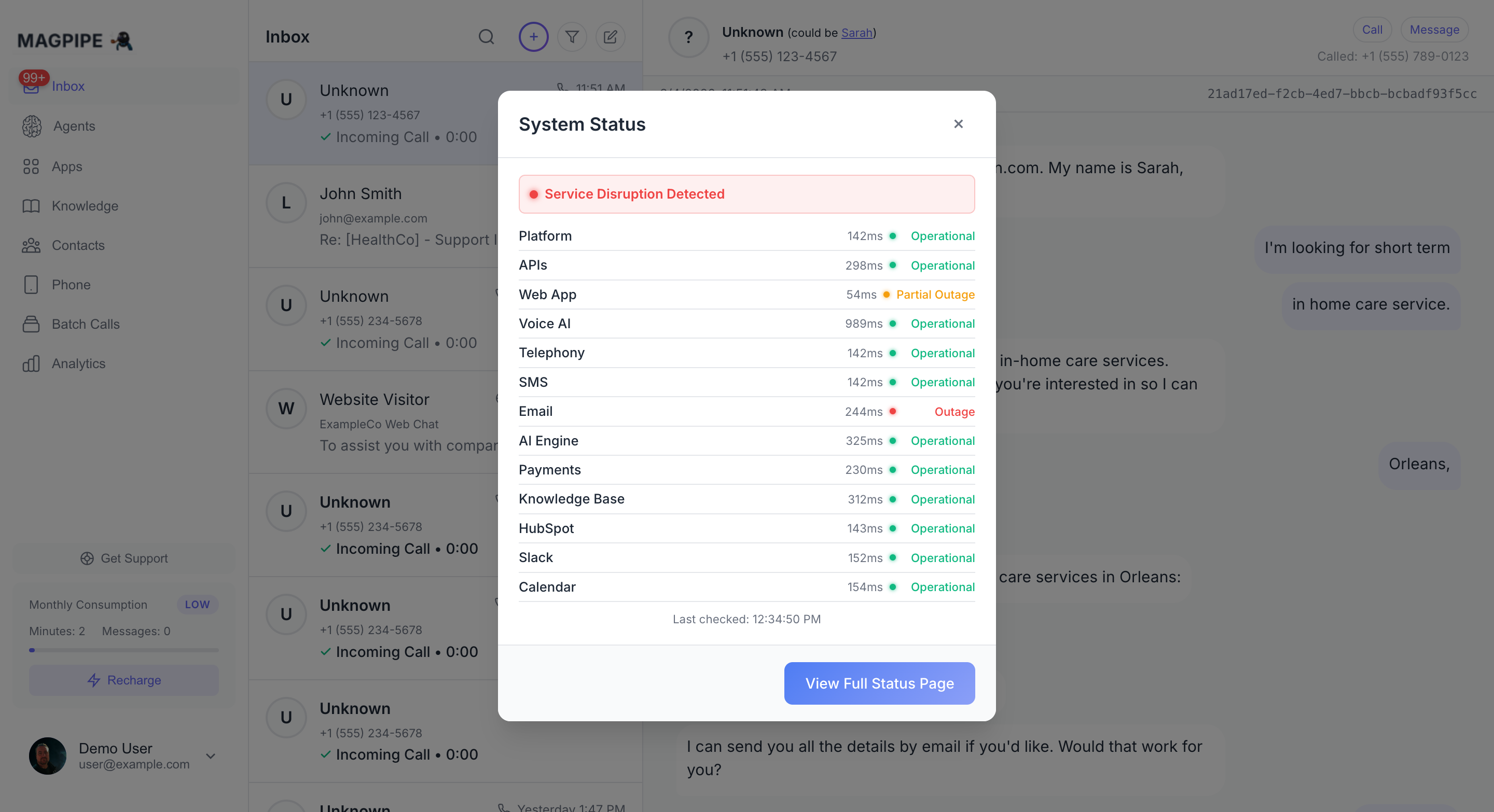 ## Monitored Services
The status page checks 13 services every 5 minutes:
| Service | What's Checked |
| -------------- | ------------------------------- |
| Platform | Supabase database connectivity |
| APIs | REST API availability |
| Web App | Vercel hosting + CDN |
| Voice AI | LiveKit, ElevenLabs, Deepgram |
| Telephony | SignalWire voice infrastructure |
| SMS | SignalWire messaging |
| Email | Postmark delivery |
| AI Engine | OpenAI API |
| Payments | Stripe API |
| Knowledge Base | Firecrawl crawling credits |
| HubSpot | Integration health |
| Slack | Integration health |
| Calendar | Cal.com integration |
## Status Levels
* **Operational** — Service is running normally
* **Partial Outage** — Service is degraded but functional (high latency, quota warnings)
* **Outage** — Service is unreachable or returning errors
## Uptime History
Each service shows a 90-day uptime bar. Hover over any day to see the exact uptime percentage and any incidents. The history adjusts to your local timezone.
Uptime calculation counts both **Operational** and **Partial Outage** as "up" — only full outages count as downtime.
## Subscribe to Alerts
At the top of the status page, you can subscribe to get notified when any service changes status.
### Email Alerts
Enter your email address to receive HTML notifications with a table showing which services changed, their old and new status, and any details.
### SMS Alerts
Select your country code and enter your phone number. SMS alerts include the affected service name and new status. SMS subscriptions are confirmed automatically — no confirmation link needed.
SMS alerts do not include URLs to avoid carrier spam filtering.
### Webhook Alerts
Expand the webhook section and enter your endpoint URL. Webhook subscriptions are confirmed immediately. When a status change occurs, your endpoint receives a POST with:
```json theme={null}
{
"event": "status_change",
"timestamp": "2026-03-02T20:30:00.000Z",
"transitions": [
{
"category": "Voice AI",
"previous_status": "operational",
"current_status": "degraded",
"detail": "High latency"
}
],
"status_page": "https://status.magpipe.ai"
}
```
## In-App Status Indicator
A status LED appears next to the Magpipe logo in the app sidebar. It updates every 5 minutes:
* **Green** — All systems operational
* **Amber** — Partial service disruption
* **Red** — Service outage detected
Click the LED to see a quick summary of all services without leaving the app.
## Unsubscribe
* **Email**: Click the unsubscribe link in any status email
* **SMS**: Reply STOP (US numbers)
* **Webhook**: No automatic unsubscribe — contact support
## Monitored Services
The status page checks 13 services every 5 minutes:
| Service | What's Checked |
| -------------- | ------------------------------- |
| Platform | Supabase database connectivity |
| APIs | REST API availability |
| Web App | Vercel hosting + CDN |
| Voice AI | LiveKit, ElevenLabs, Deepgram |
| Telephony | SignalWire voice infrastructure |
| SMS | SignalWire messaging |
| Email | Postmark delivery |
| AI Engine | OpenAI API |
| Payments | Stripe API |
| Knowledge Base | Firecrawl crawling credits |
| HubSpot | Integration health |
| Slack | Integration health |
| Calendar | Cal.com integration |
## Status Levels
* **Operational** — Service is running normally
* **Partial Outage** — Service is degraded but functional (high latency, quota warnings)
* **Outage** — Service is unreachable or returning errors
## Uptime History
Each service shows a 90-day uptime bar. Hover over any day to see the exact uptime percentage and any incidents. The history adjusts to your local timezone.
Uptime calculation counts both **Operational** and **Partial Outage** as "up" — only full outages count as downtime.
## Subscribe to Alerts
At the top of the status page, you can subscribe to get notified when any service changes status.
### Email Alerts
Enter your email address to receive HTML notifications with a table showing which services changed, their old and new status, and any details.
### SMS Alerts
Select your country code and enter your phone number. SMS alerts include the affected service name and new status. SMS subscriptions are confirmed automatically — no confirmation link needed.
SMS alerts do not include URLs to avoid carrier spam filtering.
### Webhook Alerts
Expand the webhook section and enter your endpoint URL. Webhook subscriptions are confirmed immediately. When a status change occurs, your endpoint receives a POST with:
```json theme={null}
{
"event": "status_change",
"timestamp": "2026-03-02T20:30:00.000Z",
"transitions": [
{
"category": "Voice AI",
"previous_status": "operational",
"current_status": "degraded",
"detail": "High latency"
}
],
"status_page": "https://status.magpipe.ai"
}
```
## In-App Status Indicator
A status LED appears next to the Magpipe logo in the app sidebar. It updates every 5 minutes:
* **Green** — All systems operational
* **Amber** — Partial service disruption
* **Red** — Service outage detected
Click the LED to see a quick summary of all services without leaving the app.
## Unsubscribe
* **Email**: Click the unsubscribe link in any status email
* **SMS**: Reply STOP (US numbers)
* **Webhook**: No automatic unsubscribe — contact support