> ## Documentation Index
> Fetch the complete documentation index at: https://docs.magpipe.ai/llms.txt
> Use this file to discover all available pages before exploring further.
# Webhooks
> Receive real-time event data pushed to your server when calls, messages, and chats happen
## Overview
Webhooks let you receive real-time notifications when events happen in Magpipe. Instead of polling the API for updates, Magpipe sends a `POST` request to your server with event data as soon as the event occurs — voice calls completing, SMS messages arriving or being sent, and chat sessions ending.
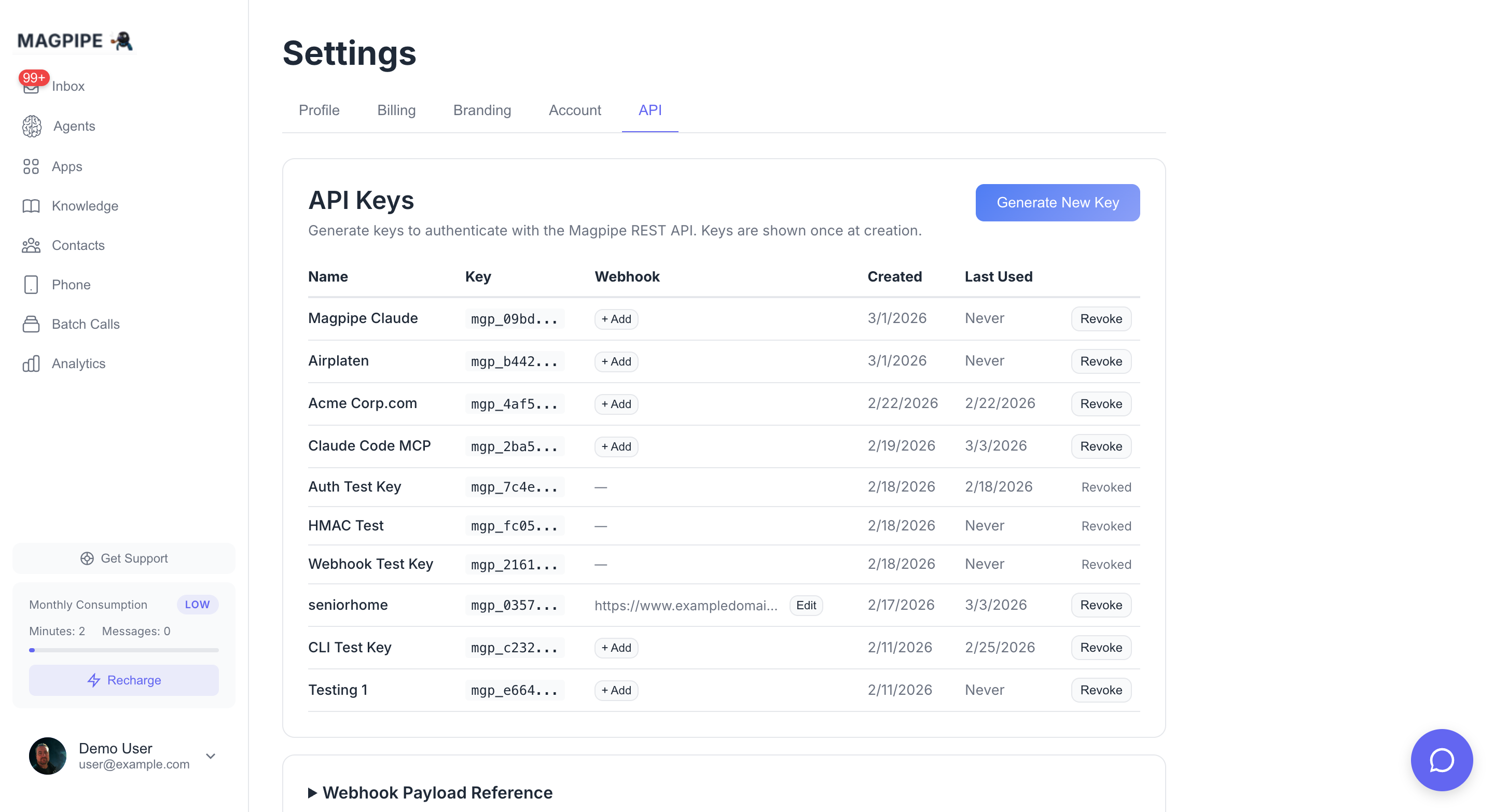
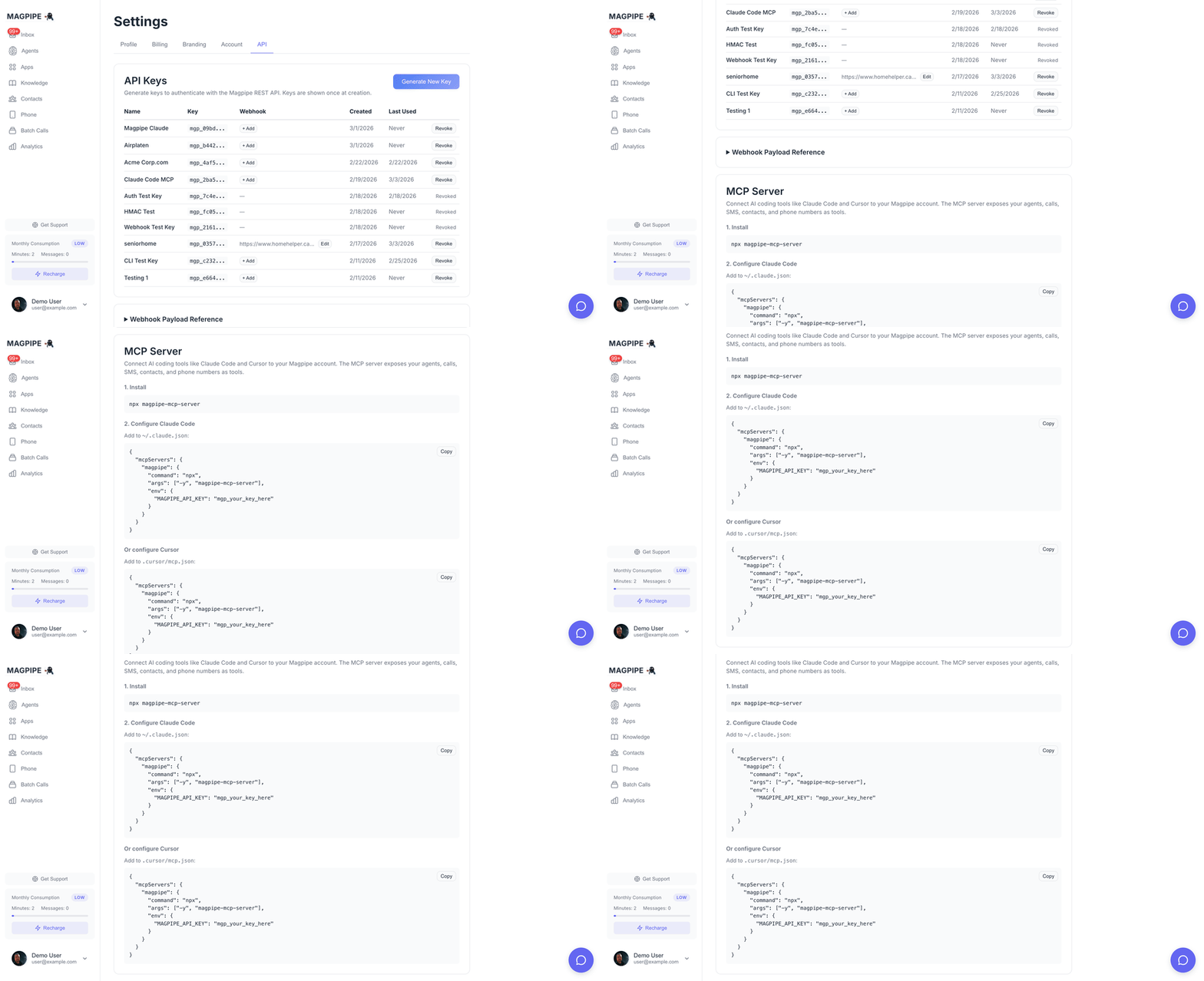 Each API key can have its own webhook URL, so you can route events to different servers for different integrations.
## Setup
1. Go to **Settings** → **API**
2. Click **Generate New Key** (or **Edit** on an existing key)
3. Enter your webhook URL (e.g., `https://your-server.com/webhook`)
4. Save — a **signing secret** is automatically generated
You can add or change the webhook URL on any existing API key at any time. The signing secret is generated automatically when you first set a URL.
### Per-number scoping
A key scoped to specific service numbers (set up when those numbers are assigned to its agents) receives number-bound events (`sms.received`, `sms.sent`, `call.completed`) **only for its own numbers** — so multiple integrations on one account stay isolated. A key with **no** number scoping receives events for every number, but only when it's the **only** webhook key on the account; on an account with multiple webhook keys an unscoped key receives nothing until it's scoped (so a new key can't accidentally pick up another integration's events). Events without a service number (e.g. `chat.session.completed`) are always delivered.
## Events
### `call.completed`
Fired when a call ends and all post-processing (transcript, summary, data extraction) is complete.
```json theme={null}
{
"event": "call.completed",
"timestamp": "2026-02-18T15:30:45.123456Z",
"data": {
"call_record_id": "550e8400-e29b-41d4-a716-446655440000",
"direction": "inbound",
"caller_number": "+16045551234",
"service_number": "+16042101966",
"agent_id": "7c9e6679-7425-40de-944b-e07fc1f90ae7",
"agent_name": "Reception Agent",
"duration_seconds": 127,
"transcript": "Agent: Hello, thanks for calling...\n\nCaller: Hi, I'd like to...",
"summary": "Caller requested to schedule a consultation for next week.",
"extracted_data": {
"caller_name": "John Smith",
"purpose": "consultation",
"preferred_date": "next Tuesday"
},
"status": "completed"
}
}
```
#### Field Reference
| Field | Type | Description |
| ------------------ | -------------- | ---------------------------------------------------------------------------- |
| `call_record_id` | string | Unique ID for the call record |
| `direction` | string | `inbound` or `outbound` |
| `caller_number` | string | Phone number of the caller (E.164 format) |
| `service_number` | string | Your Magpipe phone number that handled the call |
| `agent_id` | string | ID of the agent that handled the call |
| `agent_name` | string | Name of the agent |
| `duration_seconds` | integer | Call duration in seconds |
| `transcript` | string \| null | Full call transcript. `null` if PII storage is disabled. |
| `summary` | string \| null | AI-generated call summary. `null` if the call was too short. |
| `extracted_data` | object \| null | Data extracted via dynamic variables. `null` if not configured on the agent. |
| `status` | string | Always `completed` |
### `sms.received`
Fired when an inbound SMS lands on one of your Magpipe service numbers.
```json theme={null}
{
"event": "sms.received",
"timestamp": "2026-05-01T22:30:45.123Z",
"data": {
"sms_message_id": "550e8400-e29b-41d4-a716-446655440000",
"agent_id": "7c9e6679-7425-40de-944b-e07fc1f90ae7",
"service_number": "+15551234567",
"from_number": "+15559876543",
"to_number": "+15551234567",
"body": "Hi, can you tell me about pricing?",
"media_urls": [],
"received_at": "2026-05-01T22:30:44.000Z"
}
}
```
#### Field Reference
| Field | Type | Description |
| ---------------- | -------------- | ------------------------------------------------------------------------------------------------------------------------------------------------------------------------------------------------------------------------------------------------------------------------------------------- |
| `sms_message_id` | string \| null | Unique ID of the stored SMS row. `null` only on rare paths where no row was persisted. |
| `agent_id` | string \| null | ID of the agent assigned to the receiving number. `null` if no agent is assigned. |
| `service_number` | string | Your Magpipe phone number that received the SMS (E.164). |
| `from_number` | string | Sender's phone number (E.164). |
| `to_number` | string | Always equal to `service_number` for inbound. |
| `body` | string \| null | Message body. Respects the agent's PII storage mode — `null` if `disabled`, redacted if `redacted`. |
| `media_urls` | array | MMS media as **time-limited signed URLs** (valid \~7 days; the inbox re-signs from a durable path after expiry) — Magpipe re-hosts the carrier media so you can fetch it directly with a plain `GET`, no credentials. Download promptly; don't hot-link long-term. Empty array if no media. |
| `received_at` | string | ISO 8601 timestamp when Magpipe ingested the SMS. |
`sms.received` does **not** fire for content-loop traps (the same message repeated 3+ times by the same sender — Magpipe stops responding to break the loop). It still fires for opt-out/opt-in replies so you can track them.
### `sms.sent`
Fired when an outbound SMS is dispatched. Covers manual sends from the portal, AI-generated agent replies, notification SMS, and API-initiated sends.
```json theme={null}
{
"event": "sms.sent",
"timestamp": "2026-05-01T22:30:45.123Z",
"data": {
"sms_message_id": "9c4f8b0e-3d2a-4f1e-b6c5-8a7f3e2d1b0c",
"agent_id": "7c9e6679-7425-40de-944b-e07fc1f90ae7",
"service_number": "+15551234567",
"from_number": "+15551234567",
"to_number": "+15559876543",
"body": "Thanks for reaching out — here's the pricing info you asked about...",
"trigger": "agent_reply",
"sent_at": "2026-05-01T22:30:45.000Z"
}
}
```
#### Field Reference
| Field | Type | Description |
| ----------------- | -------------- | ------------------------------------------------------------------------------------------------------------------------------------------------------------------ |
| `sms_message_id` | string \| null | Unique ID of the stored SMS row. `null` for notification SMS (no row is persisted today). |
| `notification_id` | string | Present only when `trigger` is `notification`. Use this for customer-side dedup on the notification path. |
| `agent_id` | string \| null | ID of the agent that originated the message, or `null` for portal/manual sends. |
| `service_number` | string | The number the SMS was sent from (E.164). |
| `from_number` | string | Same as `service_number`. |
| `to_number` | string | Recipient's phone number (E.164). |
| `body` | string \| null | Message body. Respects PII storage mode same as `sms.received`. |
| `trigger` | string | Why the SMS was sent — one of: `manual` (portal), `agent_reply` (AI auto-reply), `notification` (Magpipe notifying the owner of an inbound), `api` (API/MCP send). |
| `sent_at` | string | ISO 8601 timestamp when Magpipe handed the SMS to the carrier. |
### `whatsapp.received`
Fired when an inbound WhatsApp message lands on a number whose WhatsApp account has a `webhook_url` set. This is a **per-WhatsApp-number forward** configured on the WhatsApp account (not the API-key webhook above), and it routes raw inbound messages to your endpoint instead of the AI agent replying.
```json theme={null}
{
"event": "whatsapp.received",
"conversation_id": "8f3a2b1c-...",
"from": "16045551234",
"content": "footing rebar done",
"media": [
{ "url": "https://...signed-7d...", "mime_type": "image/jpeg", "caption": "..." }
],
"phone_number_id": "1059545750567735",
"whatsapp_account_id": "...",
"message_id": "wamid.ABC...",
"context": { "in_reply_to_message_id": "wamid.XYZ..." },
"metadata": { "schedule_id": "..." },
"timestamp": "1718000000",
"contact_name": "Erik"
}
```
#### Field Reference
| Field | Type | Description |
| ----------------- | -------------- | ------------------------------------------------------------------------------------------------------------------- |
| `conversation_id` | string \| null | Stable thread id for this contact × number. |
| `from` | string | Sender's WhatsApp number (bare digits). |
| `content` | string | Message text, or the caption (`[image]` if a photo with no caption). |
| `media` | array | Inbound photos as `{ url, mime_type, caption }` — `url` is a **time-limited signed URL** (\~7 days). Empty if none. |
| `message_id` | string | The inbound WhatsApp message id (wamid). |
| `context` | object \| null | `{ in_reply_to_message_id }` when the sender replied to one of your outbound messages. |
| `metadata` | object \| null | The `metadata` you attached to the originating outbound send, echoed back for attribution. |
| `contact_name` | string \| null | WhatsApp profile name, if available. |
`whatsapp.received` is delivered to the WhatsApp account's `webhook_url` and is **not HMAC-signed** (no `x-magpipe-signature`). Setting a WhatsApp account's `webhook_url` suppresses the AI agent for that number — use one model or the other.
### `chat.session.completed`
Fired when a website chat session ends — either when the visitor explicitly closes the widget or after 30 minutes of inactivity.
```json theme={null}
{
"event": "chat.session.completed",
"timestamp": "2026-05-01T22:30:45.123Z",
"data": {
"chat_session_id": "550e8400-e29b-41d4-a716-446655440000",
"widget_id": "8f7e6d5c-4b3a-2918-7065-4f3e2d1c0b9a",
"agent_id": "7c9e6679-7425-40de-944b-e07fc1f90ae7",
"visitor_id": "v_a1b2c3d4",
"started_at": "2026-05-01T22:00:12.000Z",
"ended_at": "2026-05-01T22:30:00.000Z",
"message_count": 14,
"transcript": [
{ "role": "visitor", "content": "Hi", "timestamp": "2026-05-01T22:00:14.000Z" },
{ "role": "agent", "content": "Hello! How can I help?", "timestamp": "2026-05-01T22:00:15.000Z" }
],
"summary": "Visitor asked about senior living options in Edmonton...",
"extracted_data": {
"location": "Edmonton",
"care_needs": "memory care"
},
"ended_reason": "inactivity"
}
}
```
#### Field Reference
| Field | Type | Description |
| ----------------- | -------------- | ------------------------------------------------------------------------------------------------------------- |
| `chat_session_id` | string | Unique ID of the chat session. |
| `widget_id` | string | The widget the session belonged to. |
| `agent_id` | string \| null | ID of the agent that handled the session. |
| `visitor_id` | string | Visitor identifier (cookie or signed-in user ID). |
| `started_at` | string | ISO 8601 timestamp when the first message was sent. |
| `ended_at` | string | ISO 8601 timestamp when the session ended. |
| `message_count` | integer | Total messages exchanged. |
| `transcript` | array | Full ordered transcript: `{role, content, timestamp}` per message. `role` is `visitor`, `agent`, or `system`. |
| `summary` | string \| null | AI-generated 3-sentence summary. `null` when the visitor said too little to summarise. |
| `extracted_data` | object \| null | Data extracted via dynamic variables (mirrors `call.completed`). `null` if extraction yielded nothing. |
| `ended_reason` | string | One of `visitor_closed`, `inactivity`, `manual_close`. |
## Verifying Signatures
Every webhook request includes an `x-magpipe-signature` header containing an HMAC-SHA256 signature of the request body, signed with your webhook signing secret.
**Always verify the signature** to confirm the request came from Magpipe.
### Verification Examples
```javascript Node.js theme={null}
const crypto = require('crypto');
function verifyWebhook(body, signature, secret) {
const expected = 'sha256=' + crypto
.createHmac('sha256', secret)
.update(body)
.digest('hex');
return crypto.timingSafeEqual(
Buffer.from(signature),
Buffer.from(expected)
);
}
// In your Express handler:
app.post('/webhook', express.raw({ type: 'application/json' }), (req, res) => {
const signature = req.headers['x-magpipe-signature'];
const isValid = verifyWebhook(req.body, signature, process.env.MAGPIPE_WEBHOOK_SECRET);
if (!isValid) {
return res.status(401).send('Invalid signature');
}
const event = JSON.parse(req.body);
console.log('Received:', event.event, event.data.call_record_id);
res.status(200).send('OK');
});
```
```python Python theme={null}
import hmac
import hashlib
def verify_webhook(body: bytes, signature: str, secret: str) -> bool:
expected = 'sha256=' + hmac.new(
secret.encode('utf-8'),
body,
hashlib.sha256
).hexdigest()
return hmac.compare_digest(signature, expected)
# In your Flask handler:
@app.route('/webhook', methods=['POST'])
def handle_webhook():
signature = request.headers.get('x-magpipe-signature', '')
is_valid = verify_webhook(request.data, signature, os.environ['MAGPIPE_WEBHOOK_SECRET'])
if not is_valid:
return 'Invalid signature', 401
event = request.json
print(f"Received: {event['event']} {event['data']['call_record_id']}")
return 'OK', 200
```
```ruby Ruby theme={null}
require 'openssl'
def verify_webhook(body, signature, secret)
expected = 'sha256=' + OpenSSL::HMAC.hexdigest('SHA256', secret, body)
Rack::Utils.secure_compare(signature, expected)
end
```
### Signature Format
The `x-magpipe-signature` header value follows this format:
```
sha256=5d7e8b3c1a9f4e2d6b0c8a7f3e5d9b1c4a6f8e2d7b0c3a5f9e1d4b7c0a3f6e
```
Compute `HMAC-SHA256(webhook_secret, raw_request_body)` and compare the hex digest to the value after `sha256=`.
Always use a timing-safe comparison function (e.g., `crypto.timingSafeEqual` in Node.js, `hmac.compare_digest` in Python) to prevent timing attacks.
## Delivery Details
| Property | Value |
| ---------------- | ------------------------------------------------ |
| **Method** | `POST` |
| **Content-Type** | `application/json` |
| **Timeout** | 10 seconds per attempt |
| **Retries** | Up to 4 (5 total attempts) on transient failure |
| **Backoff** | 5s → 30s → 2 min → 10 min (with ±25% jitter) |
| **Stop signal** | Return `410 Gone` to tell Magpipe never to retry |
All delivery attempts are logged in the `webhook_deliveries` table for debugging, including the HTTP status code, response body, attempt number, and duration.
### Retry Policy
Magpipe retries delivery on:
* Network errors and timeouts
* HTTP `408 Request Timeout`
* HTTP `429 Too Many Requests`
* HTTP `5xx` errors
Magpipe does **not** retry on:
* `2xx` and `3xx` responses (treated as success)
* `410 Gone` — stops retries permanently for this delivery
* Other `4xx` responses — treated as a permanent client error and sent to the dead-letter queue immediately for replay
### Idempotency
Because retries can deliver the same event more than once, your handler should be idempotent. **Dedupe on the event-specific ID:**
| Event | Dedup key |
| ------------------------ | --------------------------------------------------------------------------------------------- |
| `call.completed` | `data.call_record_id` |
| `sms.received` | `data.sms_message_id` |
| `sms.sent` | `data.sms_message_id` (when present), or `data.notification_id` for `trigger: "notification"` |
| `chat.session.completed` | `data.chat_session_id` |
A simple `INSERT ... ON CONFLICT DO NOTHING` keyed on the dedup column on your side is enough.
### Dead-letter queue
If all retries fail (or a non-retryable `4xx` is returned), the event is moved to the `webhook_dead_letter` table. It can be inspected via the same database row-level visibility that exposes `webhook_deliveries`, and replayed manually via the [Replay API](#replay-api) below.
## Replay API
`POST /functions/v1/replay-webhook-delivery`
Authenticate with your `mgp_` API key. Two modes are supported:
### Replay one delivery
```bash theme={null}
curl -X POST https://your-project.supabase.co/functions/v1/replay-webhook-delivery \
-H "Authorization: Bearer mgp_your_api_key" \
-H "Content-Type: application/json" \
-d '{ "delivery_id": "9c4f8b0e-3d2a-4f1e-b6c5-8a7f3e2d1b0c" }'
```
`delivery_id` may reference a row in `webhook_deliveries` or `webhook_dead_letter`. The original event envelope is sent verbatim — same body, same HMAC. The replayed delivery is logged as a fresh attempt 1, separate from any prior retry chain.
### Replay a window
```bash theme={null}
curl -X POST https://your-project.supabase.co/functions/v1/replay-webhook-delivery \
-H "Authorization: Bearer mgp_your_api_key" \
-H "Content-Type: application/json" \
-d '{
"event_type": "sms.received",
"from": "2026-05-01T00:00:00Z",
"to": "2026-05-01T23:59:59Z"
}'
```
Replays every successful delivery of `event_type` in the time window (deduplicated, so multi-attempt deliveries replay once). Capped at 500 events per call. Use this to backfill after your endpoint has had downtime.
Replays are scoped to deliveries that belong to one of your `api_keys`. You can never replay another tenant's events.
## Managing Webhook Secrets
* A signing secret (`whsec_...`) is auto-generated when you first set a webhook URL on an API key
* The secret is visible in **Settings → API** — click **Edit** on any key with a webhook URL
* Clearing the webhook URL also clears the signing secret
* Setting a new webhook URL on a key that already has a secret keeps the existing secret
## Testing
Use a service like [webhook.site](https://webhook.site) to test your webhook integration:
1. Go to webhook.site and copy the unique URL
2. Set it as your webhook URL in **Settings → API**
3. Make a test call to any of your Magpipe phone numbers
4. After the call completes, check webhook.site for the delivered payload
Each API key can have its own webhook URL, so you can route events to different servers for different integrations.
## Setup
1. Go to **Settings** → **API**
2. Click **Generate New Key** (or **Edit** on an existing key)
3. Enter your webhook URL (e.g., `https://your-server.com/webhook`)
4. Save — a **signing secret** is automatically generated
You can add or change the webhook URL on any existing API key at any time. The signing secret is generated automatically when you first set a URL.
### Per-number scoping
A key scoped to specific service numbers (set up when those numbers are assigned to its agents) receives number-bound events (`sms.received`, `sms.sent`, `call.completed`) **only for its own numbers** — so multiple integrations on one account stay isolated. A key with **no** number scoping receives events for every number, but only when it's the **only** webhook key on the account; on an account with multiple webhook keys an unscoped key receives nothing until it's scoped (so a new key can't accidentally pick up another integration's events). Events without a service number (e.g. `chat.session.completed`) are always delivered.
## Events
### `call.completed`
Fired when a call ends and all post-processing (transcript, summary, data extraction) is complete.
```json theme={null}
{
"event": "call.completed",
"timestamp": "2026-02-18T15:30:45.123456Z",
"data": {
"call_record_id": "550e8400-e29b-41d4-a716-446655440000",
"direction": "inbound",
"caller_number": "+16045551234",
"service_number": "+16042101966",
"agent_id": "7c9e6679-7425-40de-944b-e07fc1f90ae7",
"agent_name": "Reception Agent",
"duration_seconds": 127,
"transcript": "Agent: Hello, thanks for calling...\n\nCaller: Hi, I'd like to...",
"summary": "Caller requested to schedule a consultation for next week.",
"extracted_data": {
"caller_name": "John Smith",
"purpose": "consultation",
"preferred_date": "next Tuesday"
},
"status": "completed"
}
}
```
#### Field Reference
| Field | Type | Description |
| ------------------ | -------------- | ---------------------------------------------------------------------------- |
| `call_record_id` | string | Unique ID for the call record |
| `direction` | string | `inbound` or `outbound` |
| `caller_number` | string | Phone number of the caller (E.164 format) |
| `service_number` | string | Your Magpipe phone number that handled the call |
| `agent_id` | string | ID of the agent that handled the call |
| `agent_name` | string | Name of the agent |
| `duration_seconds` | integer | Call duration in seconds |
| `transcript` | string \| null | Full call transcript. `null` if PII storage is disabled. |
| `summary` | string \| null | AI-generated call summary. `null` if the call was too short. |
| `extracted_data` | object \| null | Data extracted via dynamic variables. `null` if not configured on the agent. |
| `status` | string | Always `completed` |
### `sms.received`
Fired when an inbound SMS lands on one of your Magpipe service numbers.
```json theme={null}
{
"event": "sms.received",
"timestamp": "2026-05-01T22:30:45.123Z",
"data": {
"sms_message_id": "550e8400-e29b-41d4-a716-446655440000",
"agent_id": "7c9e6679-7425-40de-944b-e07fc1f90ae7",
"service_number": "+15551234567",
"from_number": "+15559876543",
"to_number": "+15551234567",
"body": "Hi, can you tell me about pricing?",
"media_urls": [],
"received_at": "2026-05-01T22:30:44.000Z"
}
}
```
#### Field Reference
| Field | Type | Description |
| ---------------- | -------------- | ------------------------------------------------------------------------------------------------------------------------------------------------------------------------------------------------------------------------------------------------------------------------------------------- |
| `sms_message_id` | string \| null | Unique ID of the stored SMS row. `null` only on rare paths where no row was persisted. |
| `agent_id` | string \| null | ID of the agent assigned to the receiving number. `null` if no agent is assigned. |
| `service_number` | string | Your Magpipe phone number that received the SMS (E.164). |
| `from_number` | string | Sender's phone number (E.164). |
| `to_number` | string | Always equal to `service_number` for inbound. |
| `body` | string \| null | Message body. Respects the agent's PII storage mode — `null` if `disabled`, redacted if `redacted`. |
| `media_urls` | array | MMS media as **time-limited signed URLs** (valid \~7 days; the inbox re-signs from a durable path after expiry) — Magpipe re-hosts the carrier media so you can fetch it directly with a plain `GET`, no credentials. Download promptly; don't hot-link long-term. Empty array if no media. |
| `received_at` | string | ISO 8601 timestamp when Magpipe ingested the SMS. |
`sms.received` does **not** fire for content-loop traps (the same message repeated 3+ times by the same sender — Magpipe stops responding to break the loop). It still fires for opt-out/opt-in replies so you can track them.
### `sms.sent`
Fired when an outbound SMS is dispatched. Covers manual sends from the portal, AI-generated agent replies, notification SMS, and API-initiated sends.
```json theme={null}
{
"event": "sms.sent",
"timestamp": "2026-05-01T22:30:45.123Z",
"data": {
"sms_message_id": "9c4f8b0e-3d2a-4f1e-b6c5-8a7f3e2d1b0c",
"agent_id": "7c9e6679-7425-40de-944b-e07fc1f90ae7",
"service_number": "+15551234567",
"from_number": "+15551234567",
"to_number": "+15559876543",
"body": "Thanks for reaching out — here's the pricing info you asked about...",
"trigger": "agent_reply",
"sent_at": "2026-05-01T22:30:45.000Z"
}
}
```
#### Field Reference
| Field | Type | Description |
| ----------------- | -------------- | ------------------------------------------------------------------------------------------------------------------------------------------------------------------ |
| `sms_message_id` | string \| null | Unique ID of the stored SMS row. `null` for notification SMS (no row is persisted today). |
| `notification_id` | string | Present only when `trigger` is `notification`. Use this for customer-side dedup on the notification path. |
| `agent_id` | string \| null | ID of the agent that originated the message, or `null` for portal/manual sends. |
| `service_number` | string | The number the SMS was sent from (E.164). |
| `from_number` | string | Same as `service_number`. |
| `to_number` | string | Recipient's phone number (E.164). |
| `body` | string \| null | Message body. Respects PII storage mode same as `sms.received`. |
| `trigger` | string | Why the SMS was sent — one of: `manual` (portal), `agent_reply` (AI auto-reply), `notification` (Magpipe notifying the owner of an inbound), `api` (API/MCP send). |
| `sent_at` | string | ISO 8601 timestamp when Magpipe handed the SMS to the carrier. |
### `whatsapp.received`
Fired when an inbound WhatsApp message lands on a number whose WhatsApp account has a `webhook_url` set. This is a **per-WhatsApp-number forward** configured on the WhatsApp account (not the API-key webhook above), and it routes raw inbound messages to your endpoint instead of the AI agent replying.
```json theme={null}
{
"event": "whatsapp.received",
"conversation_id": "8f3a2b1c-...",
"from": "16045551234",
"content": "footing rebar done",
"media": [
{ "url": "https://...signed-7d...", "mime_type": "image/jpeg", "caption": "..." }
],
"phone_number_id": "1059545750567735",
"whatsapp_account_id": "...",
"message_id": "wamid.ABC...",
"context": { "in_reply_to_message_id": "wamid.XYZ..." },
"metadata": { "schedule_id": "..." },
"timestamp": "1718000000",
"contact_name": "Erik"
}
```
#### Field Reference
| Field | Type | Description |
| ----------------- | -------------- | ------------------------------------------------------------------------------------------------------------------- |
| `conversation_id` | string \| null | Stable thread id for this contact × number. |
| `from` | string | Sender's WhatsApp number (bare digits). |
| `content` | string | Message text, or the caption (`[image]` if a photo with no caption). |
| `media` | array | Inbound photos as `{ url, mime_type, caption }` — `url` is a **time-limited signed URL** (\~7 days). Empty if none. |
| `message_id` | string | The inbound WhatsApp message id (wamid). |
| `context` | object \| null | `{ in_reply_to_message_id }` when the sender replied to one of your outbound messages. |
| `metadata` | object \| null | The `metadata` you attached to the originating outbound send, echoed back for attribution. |
| `contact_name` | string \| null | WhatsApp profile name, if available. |
`whatsapp.received` is delivered to the WhatsApp account's `webhook_url` and is **not HMAC-signed** (no `x-magpipe-signature`). Setting a WhatsApp account's `webhook_url` suppresses the AI agent for that number — use one model or the other.
### `chat.session.completed`
Fired when a website chat session ends — either when the visitor explicitly closes the widget or after 30 minutes of inactivity.
```json theme={null}
{
"event": "chat.session.completed",
"timestamp": "2026-05-01T22:30:45.123Z",
"data": {
"chat_session_id": "550e8400-e29b-41d4-a716-446655440000",
"widget_id": "8f7e6d5c-4b3a-2918-7065-4f3e2d1c0b9a",
"agent_id": "7c9e6679-7425-40de-944b-e07fc1f90ae7",
"visitor_id": "v_a1b2c3d4",
"started_at": "2026-05-01T22:00:12.000Z",
"ended_at": "2026-05-01T22:30:00.000Z",
"message_count": 14,
"transcript": [
{ "role": "visitor", "content": "Hi", "timestamp": "2026-05-01T22:00:14.000Z" },
{ "role": "agent", "content": "Hello! How can I help?", "timestamp": "2026-05-01T22:00:15.000Z" }
],
"summary": "Visitor asked about senior living options in Edmonton...",
"extracted_data": {
"location": "Edmonton",
"care_needs": "memory care"
},
"ended_reason": "inactivity"
}
}
```
#### Field Reference
| Field | Type | Description |
| ----------------- | -------------- | ------------------------------------------------------------------------------------------------------------- |
| `chat_session_id` | string | Unique ID of the chat session. |
| `widget_id` | string | The widget the session belonged to. |
| `agent_id` | string \| null | ID of the agent that handled the session. |
| `visitor_id` | string | Visitor identifier (cookie or signed-in user ID). |
| `started_at` | string | ISO 8601 timestamp when the first message was sent. |
| `ended_at` | string | ISO 8601 timestamp when the session ended. |
| `message_count` | integer | Total messages exchanged. |
| `transcript` | array | Full ordered transcript: `{role, content, timestamp}` per message. `role` is `visitor`, `agent`, or `system`. |
| `summary` | string \| null | AI-generated 3-sentence summary. `null` when the visitor said too little to summarise. |
| `extracted_data` | object \| null | Data extracted via dynamic variables (mirrors `call.completed`). `null` if extraction yielded nothing. |
| `ended_reason` | string | One of `visitor_closed`, `inactivity`, `manual_close`. |
## Verifying Signatures
Every webhook request includes an `x-magpipe-signature` header containing an HMAC-SHA256 signature of the request body, signed with your webhook signing secret.
**Always verify the signature** to confirm the request came from Magpipe.
### Verification Examples
```javascript Node.js theme={null}
const crypto = require('crypto');
function verifyWebhook(body, signature, secret) {
const expected = 'sha256=' + crypto
.createHmac('sha256', secret)
.update(body)
.digest('hex');
return crypto.timingSafeEqual(
Buffer.from(signature),
Buffer.from(expected)
);
}
// In your Express handler:
app.post('/webhook', express.raw({ type: 'application/json' }), (req, res) => {
const signature = req.headers['x-magpipe-signature'];
const isValid = verifyWebhook(req.body, signature, process.env.MAGPIPE_WEBHOOK_SECRET);
if (!isValid) {
return res.status(401).send('Invalid signature');
}
const event = JSON.parse(req.body);
console.log('Received:', event.event, event.data.call_record_id);
res.status(200).send('OK');
});
```
```python Python theme={null}
import hmac
import hashlib
def verify_webhook(body: bytes, signature: str, secret: str) -> bool:
expected = 'sha256=' + hmac.new(
secret.encode('utf-8'),
body,
hashlib.sha256
).hexdigest()
return hmac.compare_digest(signature, expected)
# In your Flask handler:
@app.route('/webhook', methods=['POST'])
def handle_webhook():
signature = request.headers.get('x-magpipe-signature', '')
is_valid = verify_webhook(request.data, signature, os.environ['MAGPIPE_WEBHOOK_SECRET'])
if not is_valid:
return 'Invalid signature', 401
event = request.json
print(f"Received: {event['event']} {event['data']['call_record_id']}")
return 'OK', 200
```
```ruby Ruby theme={null}
require 'openssl'
def verify_webhook(body, signature, secret)
expected = 'sha256=' + OpenSSL::HMAC.hexdigest('SHA256', secret, body)
Rack::Utils.secure_compare(signature, expected)
end
```
### Signature Format
The `x-magpipe-signature` header value follows this format:
```
sha256=5d7e8b3c1a9f4e2d6b0c8a7f3e5d9b1c4a6f8e2d7b0c3a5f9e1d4b7c0a3f6e
```
Compute `HMAC-SHA256(webhook_secret, raw_request_body)` and compare the hex digest to the value after `sha256=`.
Always use a timing-safe comparison function (e.g., `crypto.timingSafeEqual` in Node.js, `hmac.compare_digest` in Python) to prevent timing attacks.
## Delivery Details
| Property | Value |
| ---------------- | ------------------------------------------------ |
| **Method** | `POST` |
| **Content-Type** | `application/json` |
| **Timeout** | 10 seconds per attempt |
| **Retries** | Up to 4 (5 total attempts) on transient failure |
| **Backoff** | 5s → 30s → 2 min → 10 min (with ±25% jitter) |
| **Stop signal** | Return `410 Gone` to tell Magpipe never to retry |
All delivery attempts are logged in the `webhook_deliveries` table for debugging, including the HTTP status code, response body, attempt number, and duration.
### Retry Policy
Magpipe retries delivery on:
* Network errors and timeouts
* HTTP `408 Request Timeout`
* HTTP `429 Too Many Requests`
* HTTP `5xx` errors
Magpipe does **not** retry on:
* `2xx` and `3xx` responses (treated as success)
* `410 Gone` — stops retries permanently for this delivery
* Other `4xx` responses — treated as a permanent client error and sent to the dead-letter queue immediately for replay
### Idempotency
Because retries can deliver the same event more than once, your handler should be idempotent. **Dedupe on the event-specific ID:**
| Event | Dedup key |
| ------------------------ | --------------------------------------------------------------------------------------------- |
| `call.completed` | `data.call_record_id` |
| `sms.received` | `data.sms_message_id` |
| `sms.sent` | `data.sms_message_id` (when present), or `data.notification_id` for `trigger: "notification"` |
| `chat.session.completed` | `data.chat_session_id` |
A simple `INSERT ... ON CONFLICT DO NOTHING` keyed on the dedup column on your side is enough.
### Dead-letter queue
If all retries fail (or a non-retryable `4xx` is returned), the event is moved to the `webhook_dead_letter` table. It can be inspected via the same database row-level visibility that exposes `webhook_deliveries`, and replayed manually via the [Replay API](#replay-api) below.
## Replay API
`POST /functions/v1/replay-webhook-delivery`
Authenticate with your `mgp_` API key. Two modes are supported:
### Replay one delivery
```bash theme={null}
curl -X POST https://your-project.supabase.co/functions/v1/replay-webhook-delivery \
-H "Authorization: Bearer mgp_your_api_key" \
-H "Content-Type: application/json" \
-d '{ "delivery_id": "9c4f8b0e-3d2a-4f1e-b6c5-8a7f3e2d1b0c" }'
```
`delivery_id` may reference a row in `webhook_deliveries` or `webhook_dead_letter`. The original event envelope is sent verbatim — same body, same HMAC. The replayed delivery is logged as a fresh attempt 1, separate from any prior retry chain.
### Replay a window
```bash theme={null}
curl -X POST https://your-project.supabase.co/functions/v1/replay-webhook-delivery \
-H "Authorization: Bearer mgp_your_api_key" \
-H "Content-Type: application/json" \
-d '{
"event_type": "sms.received",
"from": "2026-05-01T00:00:00Z",
"to": "2026-05-01T23:59:59Z"
}'
```
Replays every successful delivery of `event_type` in the time window (deduplicated, so multi-attempt deliveries replay once). Capped at 500 events per call. Use this to backfill after your endpoint has had downtime.
Replays are scoped to deliveries that belong to one of your `api_keys`. You can never replay another tenant's events.
## Managing Webhook Secrets
* A signing secret (`whsec_...`) is auto-generated when you first set a webhook URL on an API key
* The secret is visible in **Settings → API** — click **Edit** on any key with a webhook URL
* Clearing the webhook URL also clears the signing secret
* Setting a new webhook URL on a key that already has a secret keeps the existing secret
## Testing
Use a service like [webhook.site](https://webhook.site) to test your webhook integration:
1. Go to webhook.site and copy the unique URL
2. Set it as your webhook URL in **Settings → API**
3. Make a test call to any of your Magpipe phone numbers
4. After the call completes, check webhook.site for the delivered payload