> ## Documentation Index
> Fetch the complete documentation index at: https://docs.magpipe.ai/llms.txt
> Use this file to discover all available pages before exploring further.
# Introduction
> Welcome to Magpipe - AI-powered communications platform
## What is Magpipe?
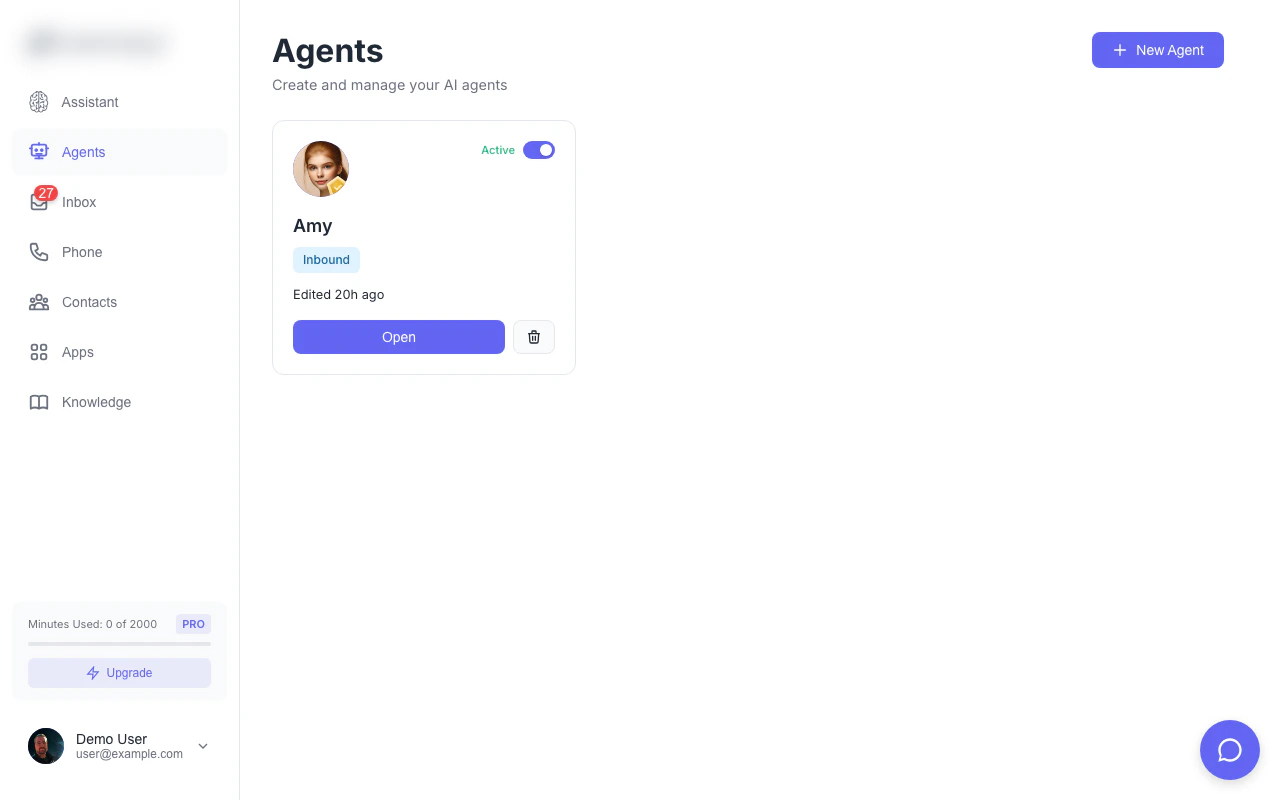
Magpipe is a complete AI-powered communications platform that handles calls, texts, email, and website chat for your business. Deploy intelligent AI agents that answer calls 24/7, respond to SMS messages, handle email, book appointments, and provide customer support — all while maintaining your brand identity.
 Get up and running in under 5 minutes
Build your first AI phone assistant
Provision a local or toll-free number
Integrate with your applications
## Platform Features
### AI Phone Agents
Create custom AI agents with unique personalities, voices, and knowledge. Each agent can:
* Answer inbound calls with natural conversation
* Make outbound calls for appointments, follow-ups, and sales
* Respond to SMS and MMS messages intelligently
* Chat with website visitors in real-time
* Book appointments via calendar integrations
* Transfer calls to humans when needed
* Access your knowledge base for accurate answers
### Multi-Channel Communication
* **Voice Calls**: HD voice with AI-powered conversation
* **SMS/MMS**: Two-way texting with image support
* **Email**: Gmail integration with AI-powered responses
* **Web Chat**: Embeddable widget for your website
* **Unified Inbox**: All conversations in one place
### Mobile Companion App
Magpipe is built as a Progressive Web App (PWA), giving you a native app experience on any device:
* **Install to Home Screen**: Add to your phone like a native app
* **Works Everywhere**: Same experience on desktop, tablet, and mobile
* **Personal Companion**: Monitor calls, reply to messages, and manage your agents on the go
* **Push Notifications**: Get alerted to new calls and messages instantly
* **Offline Access**: View recent conversations even without internet
On mobile, Magpipe becomes your personal AI assistant companion - check your inbox, listen to call recordings, and take over conversations from anywhere.
### White Label Ready
Magpipe is designed for agencies and resellers:
* Custom branding and domain
* Remove all Magpipe branding
* Your logo, colors, and identity
* Client-facing portal
* Per-client billing and management
### Team Collaboration
* **Organizations**: Create teams with multiple members
* **Role-Based Access**: Owner, Admin, and Member roles
* **Shared Resources**: Agents, numbers, and contacts across team
* **Invitation System**: Email-based team invitations
### Enterprise Features
* **Multiple Agents**: Create specialized agents for different purposes
* **External SIP Trunks**: Bring your own carrier for telephony
* **Knowledge Base**: RAG-powered contextual AI responses
* **40+ Apps**: Connect to your existing tools via MCP
* **API Access**: Full REST API for custom integrations
* **Webhooks**: Real-time event notifications
## Core Capabilities
Create unlimited AI agents with custom personalities, voices (including voice cloning), and behavior. Configure separate prompts for inbound and outbound calls, set business hours, and deploy to phone numbers or chat widgets.
Provision local and toll-free numbers, or bring your own carrier via SIP trunks. Handle unlimited concurrent calls with automatic recording, transcription, and sentiment analysis.
View all calls, texts, email, and chat conversations in a single inbox. Listen to recordings, read transcripts, reply to messages, and respond to emails. Filter by type, direction, sentiment, date, or search.
Add websites, documents, and custom content. Content is automatically chunked, embedded, and made searchable. Your agents reference this knowledge during conversations for accurate, contextual responses.
Deploy a customizable chat widget on your website. Visitors chat with your AI agent in real-time. Collect visitor information, show custom welcome messages, and hand off to humans when needed.
Connect to 40+ tools including Cal.com, HubSpot, Salesforce, Slack, and more via MCP (Model Context Protocol). Your agents can check calendars, create records, send notifications, and more.
Create organizations with multiple team members. Assign roles, manage permissions, and collaborate on agents and conversations. Perfect for agencies managing multiple clients.
Track call volume, duration, sentiment, and outcomes. View conversation history, listen to recordings, and analyze trends. Export data for reporting.
Built as a Progressive Web App (PWA) for a native experience on any device. Install to your home screen, receive push notifications, and manage everything on the go. Your personal AI assistant companion in your pocket.
## Use Cases
### Small Business
* 24/7 call answering without hiring staff
* Appointment booking and reminders
* After-hours support and message taking
* Lead qualification and routing
### Healthcare
* Patient appointment scheduling
* Prescription refill requests
* Office hours and location information
* HIPAA-compliant call handling
### Real Estate
* Property inquiry handling
* Showing scheduling
* Lead capture and qualification
* After-hours availability
### Agencies & Resellers
* White-label deployment for clients
* Multi-tenant management
* Per-client billing
* Custom branding per client
### E-commerce
* Order status inquiries
* Return and refund processing
* Product information
* Customer support
## Getting Started
1. **Sign Up**: Create your account at [magpipe.ai](https://magpipe.ai)
2. **Create an Agent**: Configure your AI assistant's personality and knowledge
3. **Get a Number**: Provision a phone number or connect your existing one
4. **Deploy**: Assign your agent to the number and start receiving calls
Complete setup walkthrough with step-by-step instructions
## Support
* **Documentation**: You're reading it!
* **Email**: [help@magpipe.ai](mailto:help@magpipe.ai)
* **Dashboard Chat**: Click the chat bubble in your dashboard
Get up and running in under 5 minutes
Build your first AI phone assistant
Provision a local or toll-free number
Integrate with your applications
## Platform Features
### AI Phone Agents
Create custom AI agents with unique personalities, voices, and knowledge. Each agent can:
* Answer inbound calls with natural conversation
* Make outbound calls for appointments, follow-ups, and sales
* Respond to SMS and MMS messages intelligently
* Chat with website visitors in real-time
* Book appointments via calendar integrations
* Transfer calls to humans when needed
* Access your knowledge base for accurate answers
### Multi-Channel Communication
* **Voice Calls**: HD voice with AI-powered conversation
* **SMS/MMS**: Two-way texting with image support
* **Email**: Gmail integration with AI-powered responses
* **Web Chat**: Embeddable widget for your website
* **Unified Inbox**: All conversations in one place
### Mobile Companion App
Magpipe is built as a Progressive Web App (PWA), giving you a native app experience on any device:
* **Install to Home Screen**: Add to your phone like a native app
* **Works Everywhere**: Same experience on desktop, tablet, and mobile
* **Personal Companion**: Monitor calls, reply to messages, and manage your agents on the go
* **Push Notifications**: Get alerted to new calls and messages instantly
* **Offline Access**: View recent conversations even without internet
On mobile, Magpipe becomes your personal AI assistant companion - check your inbox, listen to call recordings, and take over conversations from anywhere.
### White Label Ready
Magpipe is designed for agencies and resellers:
* Custom branding and domain
* Remove all Magpipe branding
* Your logo, colors, and identity
* Client-facing portal
* Per-client billing and management
### Team Collaboration
* **Organizations**: Create teams with multiple members
* **Role-Based Access**: Owner, Admin, and Member roles
* **Shared Resources**: Agents, numbers, and contacts across team
* **Invitation System**: Email-based team invitations
### Enterprise Features
* **Multiple Agents**: Create specialized agents for different purposes
* **External SIP Trunks**: Bring your own carrier for telephony
* **Knowledge Base**: RAG-powered contextual AI responses
* **40+ Apps**: Connect to your existing tools via MCP
* **API Access**: Full REST API for custom integrations
* **Webhooks**: Real-time event notifications
## Core Capabilities
Create unlimited AI agents with custom personalities, voices (including voice cloning), and behavior. Configure separate prompts for inbound and outbound calls, set business hours, and deploy to phone numbers or chat widgets.
Provision local and toll-free numbers, or bring your own carrier via SIP trunks. Handle unlimited concurrent calls with automatic recording, transcription, and sentiment analysis.
View all calls, texts, email, and chat conversations in a single inbox. Listen to recordings, read transcripts, reply to messages, and respond to emails. Filter by type, direction, sentiment, date, or search.
Add websites, documents, and custom content. Content is automatically chunked, embedded, and made searchable. Your agents reference this knowledge during conversations for accurate, contextual responses.
Deploy a customizable chat widget on your website. Visitors chat with your AI agent in real-time. Collect visitor information, show custom welcome messages, and hand off to humans when needed.
Connect to 40+ tools including Cal.com, HubSpot, Salesforce, Slack, and more via MCP (Model Context Protocol). Your agents can check calendars, create records, send notifications, and more.
Create organizations with multiple team members. Assign roles, manage permissions, and collaborate on agents and conversations. Perfect for agencies managing multiple clients.
Track call volume, duration, sentiment, and outcomes. View conversation history, listen to recordings, and analyze trends. Export data for reporting.
Built as a Progressive Web App (PWA) for a native experience on any device. Install to your home screen, receive push notifications, and manage everything on the go. Your personal AI assistant companion in your pocket.
## Use Cases
### Small Business
* 24/7 call answering without hiring staff
* Appointment booking and reminders
* After-hours support and message taking
* Lead qualification and routing
### Healthcare
* Patient appointment scheduling
* Prescription refill requests
* Office hours and location information
* HIPAA-compliant call handling
### Real Estate
* Property inquiry handling
* Showing scheduling
* Lead capture and qualification
* After-hours availability
### Agencies & Resellers
* White-label deployment for clients
* Multi-tenant management
* Per-client billing
* Custom branding per client
### E-commerce
* Order status inquiries
* Return and refund processing
* Product information
* Customer support
## Getting Started
1. **Sign Up**: Create your account at [magpipe.ai](https://magpipe.ai)
2. **Create an Agent**: Configure your AI assistant's personality and knowledge
3. **Get a Number**: Provision a phone number or connect your existing one
4. **Deploy**: Assign your agent to the number and start receiving calls
Complete setup walkthrough with step-by-step instructions
## Support
* **Documentation**: You're reading it!
* **Email**: [help@magpipe.ai](mailto:help@magpipe.ai)
* **Dashboard Chat**: Click the chat bubble in your dashboard